REPL history browser
You can browse your REPL input history with the command M-x
cider-repl-history. This command is bound to C-c M-p
in cider-repl-mode buffers and is also available via the
history shortcut.
The history is displayed in reverse order, with the most recent input at the top of the buffer, and the oldest input at the bottom. You can scroll through the history, and when you find the history item you were looking for, you can insert it from the history buffer into your REPL buffer.
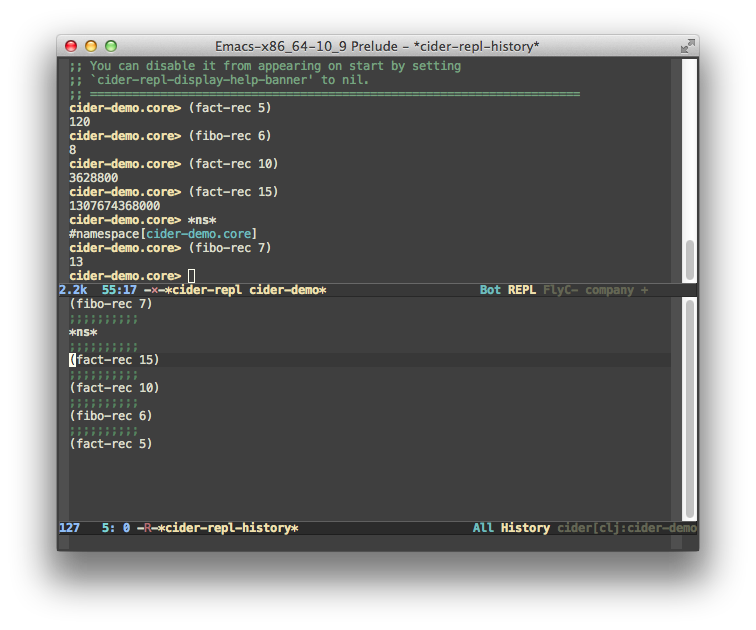
Mode
The history buffer has its own major mode,
cider-repl-history-mode. This is derived from clojure-mode, so you
get fontification in the history buffer. This mode supports the
expected defcustom hook variable, cider-repl-history-hook.
Insertion
Where you use the history buffer to insert text into the REPL buffer, the exact behavior depends on the location of the cursor in the buffer prior to the insertion.
Typically, when you’re actively using the REPL, your cursor will be at
the end of the REPL buffer (point-max). In this case, the text is
inserted at the end of the buffer and the point advances to the end of
the inserted text (as if point was pushed by along by the text as it
was inserted).
In the unusual case where you invoke the history browser when your
cursor is not at the end of the REPL buffer, the inserted text will
still be inserted at the end of the buffer (point-max), but the
point is not modified.
CIDER inserts the text without a final newline, allowing you to edit it. When you are ready, hit Return to have it evaluated by the REPL.
Quitting
If you select an input, the text will be inserted into the REPL buffer
and the history buffer will automatically quit. If you decide you want
to quit without inserting any text at all, you can explicitly quit by
running cider-repl-history-quit (see keyboard shortcuts). Because
of the initialization and cleanup that is done when using the history
buffer, it is better to quit properly rather than just switch away
from the history buffer.
When you quit the history buffer, CIDER can restore the buffer and
window configuration in a few different ways. The behavior is
controlled by cider-repl-history-quit-action, which can be assigned
one of several values:
-
quit-windowrestores the window configuration to what it was before. This is the default. -
delete-and-restorerestores the window configuration to what it was before, and kills the*cider-repl-history*buffer. -
kill-and-delete-windowkills the*cider-repl-history*buffer, and deletes the window. -
bury-buffersimply buries the*cider-repl-history*buffer, but keeps the window. -
bury-and-delete-windowburies the buffer, and deletes the window if there is more than one window. -
any other value is interpreted as the name of a function to call
Filtering
By invoking cider-repl-history-occur from the history buffer, you
will be prompted for a regular expression. The history buffer will be
filtered to only those inputs that match the regexp.
Preview and Highlight
When cider-repl-history-show-preview is non-nil, CIDER displays an
overlay
of the currently selected history entry, in the REPL buffer.
If you do not properly quit from browsing the history (i.e., if you
just C-x b away from the buffer), you may be left with an
unwanted overlay in your REPL buffer. If this happens, you can clean
it up with M-x cider-repl-history-clear-preview.
By default, cider-repl-history-show-preview is nil (disabled).
There is a related feature to highlight the entry once it is actually
inserted into the REPL buffer, controlled by the variable
cider-repl-history-highlight-inserted-item, which can be set to the
following values:
-
solidhighlights the inserted text for a fixed period of time. -
pulsecauses the highlighting to fade out gradually. -
tselects the default highlighting style, which is currentlypulse. -
nildisables highlighting. This is the default value forcider-repl-history-highlight-inserted-item.
When cider-repl-history-highlight-inserted-item is non-nil, you
can customize the face used for the inserted text with the variable
cider-repl-history-inserted-item-face.