wx.AnyButton
A class for common button functionality used as the base for the various button classes.
 Class Hierarchy
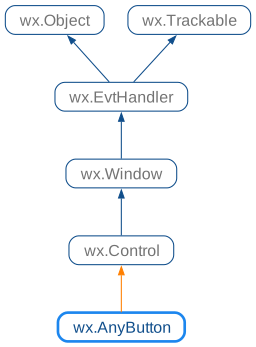
 Inheritance diagram for class AnyButton:
 Known Subclasses
 Methods Summary
Return the bitmap shown by the button. |
|
Returns the bitmap used when the mouse is over the button. |
|
Returns the bitmap used for the disabled state. |
|
Returns the bitmap used for the focused state. |
|
Returns the bitmap for the normal state. |
|
Get the margins between the bitmap and the text of the button. |
|
Returns the bitmap used when the button is pressed. |
|
Sets the bitmap to display in the button. |
|
Sets the bitmap to be shown when the mouse is over the button. |
|
Sets the bitmap for the disabled button appearance. |
|
Sets the bitmap for the button appearance when it has the keyboard focus. |
|
Sets the bitmap label for the button. |
|
Set the margins between the bitmap and the text of the button. |
|
Set the position at which the bitmap is displayed. |
|
Sets the bitmap for the selected (depressed) button appearance. |
 Properties Summary
See |
|
See |
|
See |
|
See |
|
See |
|
See |
 Class API
Possible constructors:
AnyButton() -> None
A class for common button functionality used as the base for the various button classes.
None
Return the bitmap shown by the button.
The returned bitmap may be invalid only if the button doesn’t show any images.
Added in version 2.9.1.
See also
Returns the bitmap used when the mouse is over the button.
The returned bitmap is only valid if SetBitmapCurrent had been previously called.
Added in version 2.9.1: (available as BitmapButton.GetBitmapHover() in previous versions)
Returns the bitmap used for the disabled state.
The returned bitmap is only valid if SetBitmapDisabled had been previously called.
Added in version 2.9.1: (available in wx.BitmapButton only in previous versions)
Returns the bitmap used for the focused state.
The returned bitmap is only valid if SetBitmapFocus had been previously called.
Added in version 2.9.1: (available in wx.BitmapButton only in previous versions)
Returns the bitmap for the normal state.
This is exactly the same as GetBitmap but uses a name backwards-compatible with wx.BitmapButton.
Added in version 2.9.1: (available in wx.BitmapButton only in previous versions)
See also
Get the margins between the bitmap and the text of the button.
Added in version 2.9.1.
See also
Returns the bitmap used when the button is pressed.
The returned bitmap is only valid if SetBitmapPressed had been previously called.
Added in version 2.9.1: (available as BitmapButton.GetBitmapSelected() in previous versions)
Sets the bitmap to display in the button.
The bitmap is displayed together with the button label. This method sets up a single bitmap which is used in all button states, use SetBitmapDisabled , SetBitmapPressed , SetBitmapCurrent or SetBitmapFocus to change the individual images used in different states.
bitmap (wx.BitmapBundle) – The bitmap bundle containing the resolution-dependent bitmaps to display in the button. At default DPI, the size of the bitmap is determined by the default bundle size, i.e. the value returned from wx.BitmapBundle.GetDefaultSize . If the bitmap bundle is invalid, any currently shown bitmaps are removed from the button.
dir (Direction) – The position of the bitmap inside the button. By default it is positioned to the left of the text, near to the left button border. Other possible values include wx.RIGHT, wx.TOP and wx.BOTTOM.
None
Added in version 2.9.1.