wx.GenericDirCtrl
This control can be used to place a directory listing (with optional files) on an arbitrary window.
The control contains a wx.TreeCtrl window representing the directory hierarchy, and optionally, a wx.Choice window containing a list of filters.
 Window Styles
This class supports the following styles:
wx.DIRCTRL_DIR_ONLY: Only show directories, and not files.
wx.DIRCTRL_3D_INTERNAL: Use 3D borders for internal controls. This is the default.
wx.DIRCTRL_SELECT_FIRST: When setting the default path, select the first file in the directory.
wx.DIRCTRL_SHOW_FILTERS: Show the drop-down filter list.
wx.DIRCTRL_EDIT_LABELS: Allow the folder and file labels to be editable.
wx.DIRCTRL_MULTIPLE: Allows multiple files and folders to be selected.
 Events Emitted by this Class
Event macros for events emitted by this class:
EVT_DIRCTRL_SELECTIONCHANGED: Selected directory has changed. Processes a wxEVT_DIRCTRL_SELECTIONCHANGED event type. Notice that this event is generated even for the changes done by the program itself and not only those done by the user. Available since wxWidgets 2.9.5.
EVT_DIRCTRL_FILEACTIVATED: The user activated a file by double-clicking or pressing Enter. Available since wxWidgets 2.9.5.
 Class Hierarchy
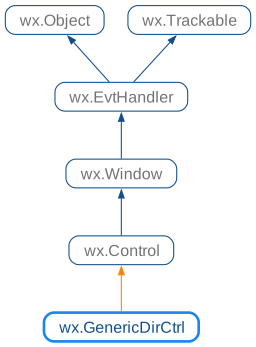
 Inheritance diagram for class GenericDirCtrl:
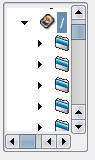
 Control Appearance
 Methods Summary
Default constructor. |
|
Collapse the given path. |
|
Collapses the entire tree. |
|
Create function for two-step construction. |
|
Tries to expand as much of the given path as possible, so that the filename or directory is visible in the tree control. |
|
Gets the default path. |
|
Gets selected filename path only (else empty string). |
|
Fills the array paths with the currently selected filepaths. |
|
Returns the filter string. |
|
Returns the current filter index (zero-based). |
|
Returns a pointer to the filter list control (if present). |
|
Gets the currently-selected directory or filename. |
|
Returns a list of the currently selected paths. |
|
Returns the root id for the tree control. |
|
Returns a pointer to the tree control. |
|
Initializes variables. |
|
Collapse and expand the tree, thus re-creating it from scratch. |
|
Selects the given item. |
|
Selects only the specified paths, clearing any previous selection. |
|
Sets the default path. |
|
Sets the filter string. |
|
Sets the current filter index (zero-based). |
|
Sets the current path. |
|
Removes the selection from all currently selected items. |
 Properties Summary
See |
|
See |
|
See |
|
See |
|
See |
|
See |
 Class API
Possible constructors:
GenericDirCtrl() -> None

GenericDirCtrl(parent, id=ID_ANY, dir=DirDialogDefaultFolderStr,
               pos=DefaultPosition, size=DefaultSize, style=DIRCTRL_DEFAULT_STYLE,
filter='',