wx.RadioBox
A radio box item is used to select one of number of mutually exclusive choices.
It is displayed as a vertical column or horizontal row of labelled buttons.
 Window Styles
This class supports the following styles:
wx.RA_SPECIFY_ROWS: The major dimension parameter refers to the maximum number of rows.
wx.RA_SPECIFY_COLS: The major dimension parameter refers to the maximum number of columns.
 Events Emitted by this Class
Handlers bound for the following event types will receive a wx.CommandEvent parameter.
EVT_RADIOBOX: Process a wxEVT_RADIOBOX event, when a radiobutton is clicked.
See also
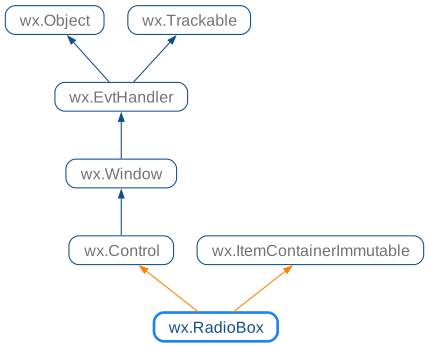
 Class Hierarchy
 Inheritance diagram for class RadioBox:
 Control Appearance
 Methods Summary
Default constructor. |
|
Creates the radiobox for two-step construction. |
|
Enables or disables an individual button in the radiobox. |
|
Finds a button matching the given string, returning the position if found, or |
|
Returns the number of columns in the radiobox. |
|
Returns the number of items in the control. |
|
Returns a radio box item under the point, a zero-based item index, or |
|
Returns the helptext associated with the specified item if any or |
|
GetItemLabel(self, n) . string |
|
Returns the tooltip associated with the specified item if any or |
|
Returns the number of rows in the radiobox. |
|
Returns the index of the selected item. |
|
Returns the label of the item with the given index. |
|
Returns |
|
Returns |
|
Sets the helptext for an item. |
|
SetItemLabel(self, n, text) |
|
Sets the tooltip text for the specified item in the radio group. |
|
Sets the selection to the given item. |
|
Sets the label for the given item. |
|
Shows or hides individual buttons. |
 Properties Summary
See |
|
See |
|
See |
|
See |
 Class API
Possible constructors:
RadioBox() -> None

RadioBox(parent, id=ID_ANY, label='', pos=DefaultPosition,
         size=DefaultSize, choices=[], majorDimension=0, style=RA_SPECIFY_COLS,
         validator=DefaultValidator, name=RadioBoxNameStr) -> None
A radio box item is used to select one of number of mutually exclusive choices.
 Overloaded Implementations:
__init__ (self)
Default constructor.