wx.TreeCtrl
A tree control presents information as a hierarchy, with items that may be expanded to show further items.
Items in a tree control are referenced by wx.TreeItemId handles, which may be tested for validity by calling wx.TreeItemId.IsOk .
A similar control with a fully native implementation for GTK+ and macOS as well is wx.dataview.DataViewTreeCtrl.
Images in TreeCtrl¶ wx.TreeCtrl inherits from wx.WithImages classes providing the functions for associating images with the control items. Each item refers to its image using an index, which can possibly by wx.WithImages.NO_IMAGE to indicate that the item doesn’t use any image at all, and the corresponding image is taken either from the vector passed to wx.WithImages.SetImages or from the image list passed to wx.WithImages.SetImageList or wx.WithImages.AssignImageList functions. In addition to normal images, handled with the methods mentioned above, wx.TreeCtrl also provides optional state images that may be used to indicate some additional state of the item, e.g. checked or unchecked status. These images can be set using SetStateImageList and AssignStateImageList functions that behave in the same way as the corresponding methods of wx.WithImages. Finally, in the generic version of this control (wxGenericTreeCtrl), also provides SetButtonsImageList and AssignButtonsImageList, which can be used to change the images used for the control buttons, used to expand or collapse its branches. These methods are not available in the native wxMSW and Qt implementations.
Events¶ Window Styles
To intercept events from a tree control, use the event table macros described in wx.TreeEvent. This class supports the following styles:
wx.TR_EDIT_LABELS: Use this style if you wish the user to be able to edit labels in the tree control.
wx.TR_NO_BUTTONS: For convenience to document that no buttons are to be drawn.
wx.TR_HAS_BUTTONS: Use this style to show + and - buttons to the left of parent items.
wx.TR_TWIST_BUTTONS: Selects alternative style of +/ - buttons and shows rotating (“twisting”) arrows instead. Currently this style is only implemented under Microsoft Windows Vista and later Windows versions and is ignored under the other platforms as enabling it is equivalent to using SystemThemedControl.EnableSystemTheme .
wx.TR_NO_LINES: Use this style to hide vertical level connectors.
wx.TR_FULL_ROW_HIGHLIGHT: Use this style to have the background colour and the selection highlight extend over the entire horizontal row of the tree control window. (This flag is ignored under Windows unless you specify TR_NO_LINES as well.)
wx.TR_LINES_AT_ROOT: Use this style to show lines leading to the root nodes (unless no TR_NO_LINES is also used, in which case no lines are shown). Note that in the MSW version, if this style is omitted, not only the lines, but also the button used for expanding the root item is not shown, which can be unexpected, so it is recommended to always use it.
wx.TR_HIDE_ROOT: Use this style to suppress the display of the root node, effectively causing the first-level nodes to appear as a series of root nodes.
wx.TR_ROW_LINES: Use this style to draw a contrasting border between displayed rows.
wx.TR_HAS_VARIABLE_ROW_HEIGHT: Use this style to cause row heights to be just big enough to fit the content. If not set, all rows use the largest row height. The default is that this flag is unset. Generic only.
wx.TR_SINGLE: For convenience to document that only one item may be selected at a time. Selecting another item causes the current selection, if any, to be deselected. This is the default.
wx.TR_MULTIPLE: Use this style to allow a range of items to be selected. If a second range is selected, the current range, if any, is deselected.
wx.TR_DEFAULT_STYLE: The set of flags that are closest to the defaults for the native control for a particular toolkit.
 Events Emitted by this Class
Handlers bound for the following event types will receive one of the wx.TreeEvent parameters.
EVT_TREE_BEGIN_DRAG: Begin dragging with the left mouse button. If you want to enable left-dragging you need to intercept this event and explicitly call wx.TreeEvent.Allow , as it’s vetoed by default. Processes a wxEVT_TREE_BEGIN_DRAG event type.
EVT_TREE_BEGIN_RDRAG: Begin dragging with the right mouse button. If you want to enable right-dragging you need to intercept this event and explicitly call wx.TreeEvent.Allow , as it’s vetoed by default. Processes a wxEVT_TREE_BEGIN_RDRAG event type.
EVT_TREE_END_DRAG: End dragging with the left or right mouse button. Processes a wxEVT_TREE_END_DRAG event type.
EVT_TREE_BEGIN_LABEL_EDIT: Begin editing a label. This can be prevented by calling Veto(). Processes a wxEVT_TREE_BEGIN_LABEL_EDIT event type.
EVT_TREE_END_LABEL_EDIT: Finish editing a label. This can be prevented by calling Veto(). Processes a wxEVT_TREE_END_LABEL_EDIT event type.
EVT_TREE_DELETE_ITEM: An item was deleted. Processes a wxEVT_TREE_DELETE_ITEM event type.
EVT_TREE_GET_INFO: Request information from the application. Processes a wxEVT_TREE_GET_INFO event type.
EVT_TREE_SET_INFO: Information is being supplied. Processes a wxEVT_TREE_SET_INFO event type.
EVT_TREE_ITEM_ACTIVATED: The item has been activated, i.e. chosen by double clicking it with mouse or from keyboard. Processes a wxEVT_TREE_ITEM_ACTIVATED event type.
EVT_TREE_ITEM_COLLAPSED: The item has been collapsed. Processes a wxEVT_TREE_ITEM_COLLAPSED event type.
EVT_TREE_ITEM_COLLAPSING: The item is being collapsed. This can be prevented by calling Veto(). Processes a wxEVT_TREE_ITEM_COLLAPSING event type.
EVT_TREE_ITEM_EXPANDED: The item has been expanded. Processes a wxEVT_TREE_ITEM_EXPANDED event type.
EVT_TREE_ITEM_EXPANDING: The item is being expanded. This can be prevented by calling Veto(). Processes a wxEVT_TREE_ITEM_EXPANDING event type.
EVT_TREE_ITEM_RIGHT_CLICK: The user has clicked the item with the right mouse button. Processes a wxEVT_TREE_ITEM_RIGHT_CLICK event type.
EVT_TREE_ITEM_MIDDLE_CLICK: The user has clicked the item with the middle mouse button. This is only supported by the generic control. Processes a wxEVT_TREE_ITEM_MIDDLE_CLICK event type.
EVT_TREE_SEL_CHANGED: Selection has changed. Processes a wxEVT_TREE_SEL_CHANGED event type.
EVT_TREE_SEL_CHANGING: Selection is changing. This can be prevented by calling Veto(). Processes a wxEVT_TREE_SEL_CHANGING event type.
EVT_TREE_KEY_DOWN: A key has been pressed. Processes a wxEVT_TREE_KEY_DOWN event type.
EVT_TREE_ITEM_GETTOOLTIP: The opportunity to set the item tooltip is being given to the application (call wx.TreeEvent.SetToolTip ). Windows only. Processes a wxEVT_TREE_ITEM_GETTOOLTIP event type.
EVT_TREE_ITEM_MENU: The context menu for the selected item has been requested, either by a right click or by using the menu key. Notice that these events always carry a valid tree item and so are not generated when (right) clicking outside of the items area. If you need to handle such events, consider using wxEVT_CONTEXT_MENU instead. Processes a wxEVT_TREE_ITEM_MENU event type.
EVT_TREE_STATE_IMAGE_CLICK: The state image has been clicked. Processes a wxEVT_TREE_STATE_IMAGE_CLICK event type.
See also
See also
wx.dataview.DataViewTreeCtrl, wx.TreeEvent, TreeItemData , TreeCtrl Overview, wx.ListBox, wx.ListCtrl, wx.WithImages
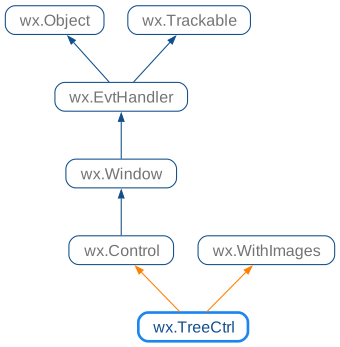
 Class Hierarchy
 Inheritance diagram for class TreeCtrl:
 Control Appearance
 Methods Summary
Default Constructor. |
|
Adds the root node to the tree, returning the new item. |
|
Appends an item to the end of the branch identified by parent, return a new item id. |
|
Sets the state image list. |
|
Clears the currently focused item. |
|
Collapses the given item. |
|
Collapses the root item. |
|
Collapses this item and all of its children, recursively. |
|
Collapses the given item and removes all children. |
|
Creates the tree control. |
|
Deletes the specified item. |
|
Deletes all items in the control. |
|
Deletes all children of the given item (but not the item itself). |
|
Starts editing the label of the given item. |
|
Enable or disable a beep if there is no match for the currently entered text when searching for the item from keyboard. |
|
Can be used to disable the system theme of controls using it by default. |
|
Ends label editing. |
|
Scrolls and/or expands items to ensure that the given item is visible. |
|
Expands the given item. |
|