wx.adv.AnimationCtrl
This is a static control which displays an animation.
wx.adv.AnimationCtrl API is as simple as possible and won’t give you full control on the animation; if you need it then use wx.media.MediaCtrl.
This control is useful to display a (small) animation while doing a long task (e.g. a “throbber”).
It is only available if USE_ANIMATIONCTRL is set to 1 (the default).
For the platforms where this control has a native implementation, it may have only limited support for the animation types, see wx.adv.GenericAnimationCtrl if you need to support all of them.
 Window Styles
This class supports the following styles:
wx.adv.AC_DEFAULT_STYLE: The default style: wx.BORDER_NONE.
wx.adv.AC_NO_AUTORESIZE: By default, the control will adjust its size to exactly fit to the size of the animation when SetAnimation is called. If this style flag is given, the control will not change its size
Implementations:GTK, MSW ports; a generic implementation is used elsewhere.
See also
wx.adv.Animation, Animation Sample
 Class Hierarchy
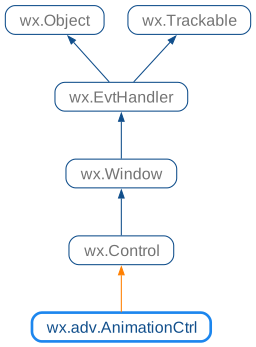
 Inheritance diagram for class AnimationCtrl:
 Control Appearance
 Known Subclasses
 Methods Summary
Initializes the object and calls |
|
Creates the control with the given anim animation. |
|
Create a new animation object compatible with this control. |
|
Create a new animation object compatible with this control. |
|
Returns the animation associated with this control. |
|
Returns the inactive bitmap shown in this control when the; see |
|
Returns |
|
Loads the animation from the given stream and calls |
|
Loads the animation from the given file and calls |
|
Starts playing the animation. |
|
Sets the animation to play in this control. |
|
Sets the bitmap to show on the control when it’s not playing an animation. |
|
Stops playing the animation. |
 Properties Summary
See |
|
See |
 Class API
Possible constructors:
AnimationCtrl(parent, id=ID_ANY, anim=NullAnimation,
              pos=DefaultPosition, size=DefaultSize, style=AC_DEFAULT_STYLE,
              name=AnimationCtrlNameStr) -> None
This is a static control which displays an animation.
Initializes the object and calls Create with all the parameters.
parent (wx.Window)
id (wx.WindowID)
anim (wx.adv.Animation)
pos (wx.Point)
size (wx.Size)
style (long)
name (string)
None
Creates the control with the given anim animation.
After control creation you must explicitly call Play to start to play the animation. Until that function won’t be called, the first frame of the animation is displayed.
parent (wx.Window) – Parent window, must be not None.
id (wx.WindowID) – The identifier for the control.
anim (wx.adv.Animation) – The initial animation shown in the control.
pos (wx.Point) – Initial position.