wx.adv.BitmapComboBox
A combobox that displays bitmap in front of the list items.
It currently only allows using bitmaps of one size, and resizes itself so that a bitmap can be shown next to the text field.
 Window Styles
This class supports the following styles:
wx.CB_READONLY: Creates a combobox without a text editor. On some platforms the control may appear very different when this style is used.
wx.CB_SORT: Sorts the entries in the list alphabetically.
wx.TE_PROCESS_ENTER: The control will generate the event wxEVT_TEXT_ENTER (otherwise pressing Enter key is either processed internally by the control or used for navigation between dialog controls). Windows only.
 Events Emitted by this Class
Handlers bound for the following event types will receive a wx.CommandEvent parameter.
EVT_COMBOBOX: Process a wxEVT_COMBOBOX event, when an item on the list is selected.
EVT_TEXT: Process a wxEVT_TEXT event, when the combobox text changes.
EVT_TEXT_ENTER: Process a wxEVT_TEXT_ENTER event, when RETURN is pressed in the combobox.
Note
While wx.adv.BitmapComboBox contains the wx.ComboBox API, but it might not actually be derived from that class. In fact, if the platform does not have a native implementation, wx.adv.BitmapComboBox will inherit from wx.adv.OwnerDrawnComboBox. You can determine if the implementation is generic by checking whether GENERIC_BITMAPCOMBOBOX is defined. Currently wx.adv.BitmapComboBox is implemented natively for MSW and GTK+.
See also
wx.ComboBox, wx.Choice, wx.adv.OwnerDrawnComboBox, wx.CommandEvent
Todo
create CB_PROCESS_ENTER rather than reusing wx.TE_PROCESS_ENTER!
 Class Hierarchy
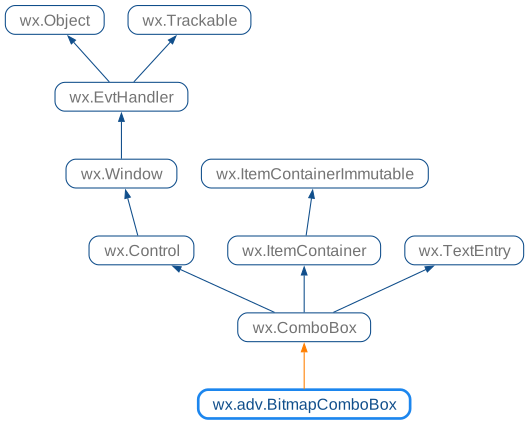
 Inheritance diagram for class BitmapComboBox:
 Control Appearance
 Methods Summary
Default constructor. |
|
Adds the item to the end of the combo box. |
|
Creates the combobox for two-step construction. |
|
Hides the list box portion of the combo box. |
|
Finds an item whose label matches the given string. |
|
Returns the size of the bitmaps used in the combo box. |
|
Returns the number of items in the control. |
|
Same as |
|
Returns the bitmap of the item with the given index. |
|
Returns the index of the selected item or |
|
Gets the current selection span. |
|
Returns the label of the item with the given index. |
|
Inserts the item into the list before pos. |
|
Returns |
|
Returns |
|
Shows the list box portion of the combo box. |
|
Sets the bitmap for the given item. |
|
Same as |
|
Changes the text of the specified combobox item. |
|
Same as |
|
Sets the text for the combobox text field. |
 Properties Summary
See |
|
See |
|
See |
 Class API
Possible constructors:
BitmapComboBox() -> None

BitmapComboBox(parent, id=ID_ANY, value='', pos=DefaultPosition,
               size=DefaultSize, choices=[], style=0, validator=DefaultValidator,
               name=BitmapComboBoxNameStr) -> None
A combobox that displays bitmap in front of the list items.
 Overloaded Implementations:
__init__ (self)
Default constructor.
None