wx.html.HtmlHelpController
This help controller provides an easy way of displaying HTML help in your application (see HTML Sample, test example).
The help system is based on books (see wx.html.HtmlHelpController.AddBook ). A book is a logical section of documentation (for example “User’s Guide” or “Programmer’s Guide” or “C++ Reference” or “wxWidgets Reference”). The help controller can handle as many books as you want.
Although this class has an API compatible with other wxWidgets help controllers as documented by wx.HelpController , it is recommended that you use the enhanced capabilities of wx.html.HtmlHelpController’s API.
HTML uses Microsoft’s HTML Help Workshop project files (.hhp, .hhk, .hhc) as its native format. The file format is described in Help Files Format. The directory helpfiles in the HTML Sample contains sample project files.
Note that the Microsoft’s HTML Help Workshop (http://www.microsoft.com/downloads/details.aspx?FamilyID=00535334-c8a6-452f-9aa0-d597d16580cc) also runs on other platforms using WINE (http://www.winehq.org/) and it can be used to create the .hpp, .hhk and .hhc files through a friendly GUI. The commercial tool HelpBlocks (http://www.helpblocks.com) can also create these files.
See also
BestHelpController, wx.html.HtmlHelpFrame, wx.html.HtmlHelpDialog, wx.html.HtmlHelpWindow, wx.html.HtmlModalHelp
 Class Hierarchy
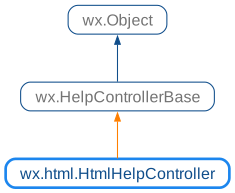
 Inheritance diagram for class HtmlHelpController:
 Methods Summary
Constructor. |
|
Adds a book (i.e. |
|
This protected virtual method may be overridden so that when specifying the |
|
This protected virtual method may be overridden so that the controller uses a different frame. |
|
Displays page x. |
|
Displays help window and focuses contents panel. |
|
Displays help window and focuses index panel. |
|
Returns the current help dialog. |
|
Returns the current help frame. |
|
Get the current help window. |
|
Displays the help window, focuses search panel and starts searching. |
|
Reads the controller’s setting (position of window, etc.) |
|
Set the help window to be managed by this controller. |
|
Sets whether the help frame should prevent application from exiting if it’s the only remaining top level window. |
|
Sets the path for storing temporary files - cached binary versions of index and contents files. |
|
Sets format of title of the frame. |
|
Associates the config object with the controller. |
|
Stores controllers setting (position of window etc.) |
 Properties Summary
See |
|
See |
|
See |
 Class API
Possible constructors:
HtmlHelpController(style=HF_DEFAULT_STYLE, parentWindow=None) -> None

HtmlHelpController(parentWindow, style=HF_DEFAULT_STYLE) -> None
This help controller provides an easy way of displaying HTML help in your application (see HTML Sample, test example).
 Overloaded Implementations:
__init__ (self, style=HF_DEFAULT_STYLE, parentWindow=None)
Constructor.
style (int) – This is a combination of these flags:
wx.html.HF_TOOLBAR: The help window has a toolbar.
wx.html.HF_FLAT_TOOLBAR: The help window has a toolbar with flat buttons (aka coolbar).
wx.html.HF_CONTENTS: The help window has a contents panel.
wx.html.HF_INDEX: The help window has an index panel.
wx.html.HF_SEARCH: The help window has a search panel.
wx.html.HF_BOOKMARKS: The help window has bookmarks controls.
wx.html.HF_OPEN_FILES: Allows user to open arbitrary HTML document.
wx.html.HF_PRINT: The toolbar contains “print” button.
wx.html.HF_MERGE_BOOKS: The contents pane does not show book nodes. All books are merged together and appear as single book to the user.
wx.html.HF_ICONS_BOOK: All nodes in contents pane have a book icon. This is how Microsoft’s HTML help viewer behaves.
wx.html.HF_ICONS_FOLDER: Book nodes in contents pane have a book icon, book’s sections have a folder icon. This is the default.
wx.html.HF_ICONS_BOOK_CHAPTER: Both book nodes and nodes of top-level sections of a book (i.e. chapters) have a book icon, all other sections (sections, subsections, …) have a folder icon.
wx.html.HF_EMBEDDED: Specifies that the help controller controls an embedded window of class wx.html.HtmlHelpWindow that should not be destroyed when the controller is destroyed.
wx.html.HF_DIALOG: Specifies that the help controller should create a dialog containing the help window.
wx.html.HF_FRAME: Specifies that the help controller should create a frame containing the help window. This is the default if neither wx.html.HF_DIALOG nor wx.html.HF_EMBEDDED is specified.
wx.html.HF_MODAL: Specifies that the help controller should create a modal dialog containing the help window (used with the wx.html.HF_DIALOG style).
wx.html.HF_DEFAULT_STYLE: wx.html.HF_TOOLBAR | wx.html.HF_CONTENTS | wx.html.HF_INDEX | wx.html.HF_SEARCH | wx.html.HF_BOOKMARKS | wx.html.HF_PRINT
parentWindow (wx.Window) – This is an optional window to be used as the parent for the help window.
None
__init__ (self, parentWindow, style=HF_DEFAULT_STYLE)
parentWindow (wx.Window)
style (int)
None