Navigation

- Home |
- Gallery |
- API Docs »
- wx.lib »
- wx.lib.agw »
- wx.lib.agw.buttonpanel »
- wx.lib.agw.buttonpanel.ButtonPanel
- index
- modules |
- next |
- previous |
 wx.lib.agw.buttonpanel.ButtonPanel
A custom panel class with gradient background shading with the possibility to add buttons and controls still respecting the gradient background.
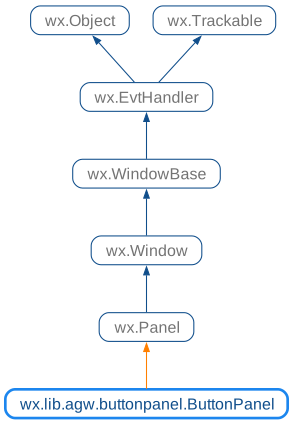
 Class Hierarchy
 Inheritance diagram for class ButtonPanel:
 Control Appearance
 Known Superclasses
 Methods Summary
Default class constructor. |
|
Adds a button to |
|
Adds a wxPython control to |
|
Adds a separator line to |
|
Adds a spacer (stretchable or fixed-size) to |
|
Clears the |
|
Gets the size which best suits |
|
Shows tooltips and long help strings in |
|
Do the Layout for |
|
Layout the items when the main caption exists. |
|
Returns the buttons alignment. |
|
Returns the main caption text. |
|
Returns the associated |
|
Returns the wxPython controls that belongs to |
|
Returns the size of an item in the main |
|
Returns all the |
|
Returns the |
|
Returns whether or not short and long help strings should be displayed as tooltips |
|
Returns whether |
|
HitTest method for |
|
Returns whether |
|
Returns whether |
|
Layout the items using a different algorithms depending on the existence |
|
Handles the |
|
Handles the |
|
Handles the |
|
Handles the |
|
Handles the |
|
Handles the |
|
Handles the |
|
Handles the |
|
Handles the timer expiring to delete the long help string in |
|
Recreates the |
|
Remove all the buttons from |
|
Remove all the separators from |
|
Removes the tooltips and statusbar help (if any) for a button. |
|
Removes the main caption text. |
|
Repaints the old selected/hovered button. |
|
Sets the buttons alignment. |
|
Sets the main caption text. |
|
Sets a new |
|
Sets the |
|
Sets whether or not short and long help strings should be displayed as tooltips |
|
Layout the items when no main caption exists. |
 Class API
A custom panel class with gradient background shading with the possibility to add buttons and controls still respecting the gradient background.
Default class constructor.
parent (wx.Window) – the parent window. Must not be None;
id (integer) – window identifier. If wx.ID_ANY, will automatically create an identifier;
text (string) – the main caption text for ButtonPanel;
agwStyle (integer) – the AGW-specific window style (one of BP_DEFAULT_STYLE, BP_USE_GRADIENT);
alignment (integer) – alignment of buttons (left or right);
name (string) – window class name.
Adds a button to ButtonPanel.
btnInfo – an instance of ButtonInfo.
Note
Remember to pass a ButtonInfo instance to this method, and not a
standard Button or a ToolBar tool.
Adds a wxPython control to ButtonPanel.
Adds a separator line to ButtonPanel.