
11.1. pathlib — Object-oriented filesystem paths
3.4 版新加入.
Source code: Lib/pathlib.py
This module offers classes representing filesystem paths with semantics appropriate for different operating systems. Path classes are divided between pure paths, which provide purely computational operations without I/O, and concrete paths, which inherit from pure paths but also provide I/O operations.
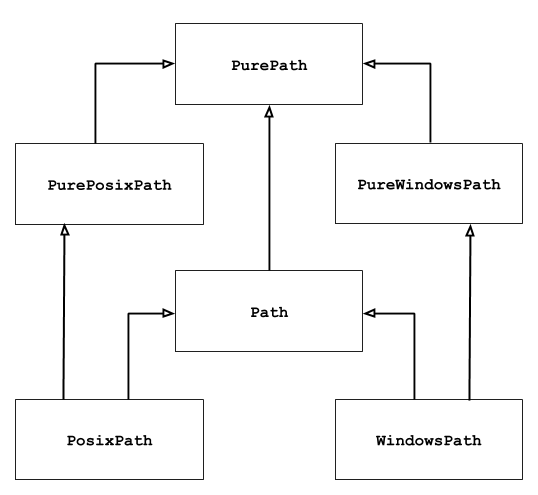
If you’ve never used this module before or just aren’t sure which class is
right for your task, Path is most likely what you need. It instantiates
a concrete path for the platform the code is running on.
Pure paths are useful in some special cases; for example:
- If you want to manipulate Windows paths on a Unix machine (or vice versa).
You cannot instantiate a
WindowsPathwhen running on Unix, but you can instantiatePureWindowsPath. - You want to make sure that your code only manipulates paths without actually accessing the OS. In this case, instantiating one of the pure classes may be useful since those simply don’t have any OS-accessing operations.
也參考
PEP 428: The pathlib module – object-oriented filesystem paths.
也參考
For low-level path manipulation on strings, you can also use the
os.path module.
11.1.1. Basic use
Importing the main class:
>>> from pathlib import Path
Listing subdirectories:
>>> p = Path('.')
>>> [x for x in p.iterdir() if x.is_dir()]
[PosixPath('.hg'), PosixPath('docs'), PosixPath('dist'),
 PosixPath('__pycache__'), PosixPath('build')]
Listing Python source files in this directory tree:
>>> list(p.glob('**/*.py'))
[PosixPath('test_pathlib.py'), PosixPath('setup.py'),
 PosixPath('pathlib.py'), PosixPath('docs/conf.py'),
 PosixPath('build/lib/pathlib.py')]
Navigating inside a directory tree:
>>> p = Path('/etc')
>>> q = p / 'init.d' / 'reboot'
>>> q
PosixPath('/etc/init.d/reboot')
>>> q.resolve()
PosixPath('/etc/rc.d/init.d/halt')
Querying path properties:
>>> q.exists()
True
>>> q.is_dir()
False
Opening a file:
>>> with q.open() as f: f.readline()
...
'#!/bin/bash\n'
11.1.2. Pure paths
Pure path objects provide path-handling operations which don’t actually access a filesystem. There are three ways to access these classes, which we also call flavours:
-
class
pathlib.PurePath(*pathsegments)¶ A generic class that represents the system’s path flavour (instantiating it creates either a
PurePosixPathor aPureWindowsPath):>>> PurePath('setup.py') # Running on a Unix machine PurePosixPath('setup.py')
Each element of pathsegments can be either a string representing a path segment, an object implementing the
os.PathLikeinterface which returns a string, or another path object:>>> PurePath('foo', 'some/path', 'bar') PurePosixPath('foo/some/path/bar') >>> PurePath(Path('foo'), Path('bar')) PurePosixPath('foo/bar')
When pathsegments is empty, the current directory is assumed:
>>> PurePath()
PurePosixPath('.')
When several absolute paths are given, the last is taken as an anchor (mimicking
os.path.join()』s behaviour):>>> PurePath('/etc', '/usr', 'lib64') PurePosixPath('/usr/lib64') >>> PureWindowsPath('c:/Windows', 'd:bar') PureWindowsPath('d:bar')
However, in a Windows path, changing the local root doesn’t discard the previous drive setting:
>>> PureWindowsPath('c:/Windows', '/Program Files')
PureWindowsPath('c:/Program Files')
Spurious slashes and single dots are collapsed, but double dots (
'..') are not, since this would change the meaning of a path in the face of symbolic links:>>> PurePath('foo//bar') PurePosixPath('foo/bar') >>> PurePath('foo/./bar') PurePosixPath('foo/bar') >>> PurePath('foo/../bar') PurePosixPath('foo/../bar')
(a naïve approach would make
PurePosixPath('foo/../bar')equivalent toPurePosixPath('bar'), which is wrong iffoois a symbolic link to another directory)Pure path objects implement the
os.PathLikeinterface, allowing them to be used anywhere the interface is accepted.3.6 版更變: Added support for the
os.PathLikeinterface.
-
class
pathlib.PurePosixPath(*pathsegments)¶ A subclass of
PurePath, this path flavour represents non-Windows filesystem paths:>>> PurePosixPath('/etc') PurePosixPath('/etc')
pathsegments is specified similarly to
PurePath.
-
class
pathlib.PureWindowsPath(*pathsegments)¶ A subclass of
PurePath, this path flavour represents Windows filesystem paths:>>> PureWindowsPath('c:/Program Files/') PureWindowsPath('c:/Program Files')
pathsegments is specified similarly to
PurePath.
Regardless of the system you’re running on, you can instantiate all of these classes, since they don’t provide any operation that does system calls.
11.1.2.1. General properties
Paths are immutable and hashable. Paths of a same flavour are comparable and orderable. These properties respect the flavour’s case-folding semantics:
>>> PurePosixPath('foo') == PurePosixPath('FOO')
False
>>> PureWindowsPath('foo') == PureWindowsPath('FOO')
True
>>> PureWindowsPath('FOO') in { PureWindowsPath('foo') }
True
>>> PureWindowsPath('C:') < PureWindowsPath('d:')
True
Paths of a different flavour compare unequal and cannot be ordered:
>>> PureWindowsPath('foo') == PurePosixPath('foo')
False
>>> PureWindowsPath('foo') < PurePosixPath('foo')
Traceback (most recent call last):
  File "<stdin>", line 1, in <module>
TypeError: '<' not supported between instances of 'PureWindowsPath' and 'PurePosixPath'
11.1.2.2. Operators
The slash operator helps create child paths, similarly to os.path.join():
>>> p = PurePath('/etc')
>>> p
PurePosixPath('/etc')
>>> p / 'init.d' / 'apache2'
PurePosixPath('/etc/init.d/apache2')
>>> q = PurePath('bin')
>>> '/usr' / q
PurePosixPath('/usr/bin')
A path object can be used anywhere an object implementing os.PathLike
is accepted:
>>> import os
>>> p = PurePath('/etc')
>>> os.fspath(p)
'/etc'
The string representation of a path is the raw filesystem path itself (in native form, e.g. with backslashes under Windows), which you can pass to any function taking a file path as a string:
>>> p = PurePath('/etc')
>>> str(p)
'/etc'
>>> p = PureWindowsPath('c:/Program Files')
>>> str(p)
'c:\\Program Files'
Similarly, calling bytes on a path gives the raw filesystem path as a
bytes object, as encoded by os.fsencode():
>>> bytes(p)
b'/etc'
備註
Calling bytes is only recommended under Unix. Under Windows,
the unicode form is the canonical representation of filesystem paths.
11.1.2.3. Accessing individual parts
To access the individual 「parts」 (components) of a path, use the following property:
-
PurePath.parts¶ A tuple giving access to the path’s various components:
>>> p = PurePath('/usr/bin/python3')
>>> p.parts
('/', 'usr', 'bin', 'python3')

>>> p = PureWindowsPath('c:/Program Files/PSF')
>>> p.parts
('c:\\', 'Program Files', 'PSF')
(note how the drive and local root are regrouped in a single part)
11.1.2.4. Methods and properties
Pure paths provide the following methods and properties:
-
PurePath.drive¶ A string representing the drive letter or name, if any:
>>> PureWindowsPath('c:/Program Files/').drive
'c:'
>>> PureWindowsPath('/Program Files/').drive
''
>>> PurePosixPath('/etc').drive
''
UNC shares are also considered drives:
>>> PureWindowsPath('//host/share/foo.txt').drive
'\\\\host\\share'
-
PurePath.root¶ A string representing the (local or global) root, if any:
>>> PureWindowsPath('c:/Program Files/').root
'\\'
>>> PureWindowsPath('c:Program Files/').root
''
>>> PurePosixPath('/etc').root
'/'
UNC shares always have a root:
>>> PureWindowsPath('//host/share').root
'\\'
-
PurePath.anchor¶ The concatenation of the drive and root:
>>> PureWindowsPath('c:/Program Files/').anchor
'c:\\'
>>> PureWindowsPath('c:Program Files/').anchor
'c:'
>>> PurePosixPath('/etc').anchor
'/'
>>> PureWindowsPath('//host/share').anchor
'\\\\host\\share\\'
-
PurePath.parents¶ An immutable sequence providing access to the logical ancestors of the path: