
datetime --- 日期與時間的基本型別
原始碼:Lib/datetime.py
datetime 模組提供操作日期與時間的類別。
While date and time arithmetic is supported, the focus of the implementation is on efficient attribute extraction for output formatting and manipulation.
小訣竅
也參考
calendar模組與日曆相關的一般函式。
time模組Time access and conversions.
zoneinfo模組Concrete time zones representing the IANA time zone database.
- dateutil 套件
帶有時區與剖析擴充支援的第三方函式庫。
- DateType 套件
Third-party library that introduces distinct static types to for example, allow static type checkers to differentiate between naive and aware datetimes.
Aware and naive objects
Date and time objects may be categorized as "aware" or "naive" depending on whether or not they include time zone information.
With sufficient knowledge of applicable algorithmic and political time adjustments, such as time zone and daylight saving time information, an aware object can locate itself relative to other aware objects. An aware object represents a specific moment in time that is not open to interpretation. [1]
A naive object does not contain enough information to unambiguously locate itself relative to other date/time objects. Whether a naive object represents Coordinated Universal Time (UTC), local time, or time in some other time zone is purely up to the program, just like it is up to the program whether a particular number represents metres, miles, or mass. Naive objects are easy to understand and to work with, at the cost of ignoring some aspects of reality.
For applications requiring aware objects, datetime and time
objects have an optional time zone information attribute, tzinfo, that
can be set to an instance of a subclass of the abstract tzinfo class.
These tzinfo objects capture information about the offset from UTC
time, the time zone name, and whether daylight saving time is in effect.
Only one concrete tzinfo class, the timezone class, is
supplied by the datetime module. The timezone class can
represent simple time zones with fixed offsets from UTC, such as UTC itself or
North American EST and EDT time zones. Supporting time zones at deeper levels of
detail is up to the application. The rules for time adjustment across the
world are more political than rational, change frequently, and there is no
standard suitable for every application aside from UTC.
常數
datetime 模組匯出以下常數:
- datetime.UTC
Alias for the UTC time zone singleton
datetime.timezone.utc.在 3.11 版被加入.
Available types
- class datetime.date
An idealized naive date, assuming the current Gregorian calendar always was, and always will be, in effect. Attributes:
year,month, andday.
- class datetime.time
An idealized time, independent of any particular day, assuming that every day has exactly 24*60*60 seconds. (There is no notion of "leap seconds" here.) Attributes:
hour,minute,second,microsecond, andtzinfo.
- class datetime.datetime
A combination of a date and a time. Attributes:
year,month,day,hour,minute,second,microsecond, andtzinfo.
- class datetime.tzinfo
An abstract base class for time zone information objects. These are used by the
datetimeandtimeclasses to provide a customizable notion of time adjustment (for example, to account for time zone and/or daylight saving time).
- class datetime.timezone
A class that implements the
tzinfoabstract base class as a fixed offset from the UTC.在 3.2 版被加入.
Objects of these types are immutable.
Subclass relationships:
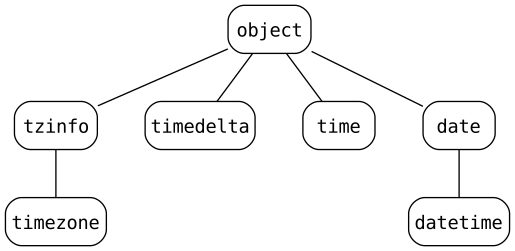
常見屬性
The date, datetime, time, and timezone types
share these common features:
Determining if an object is aware or naive
Objects of the date type are always naive.
An object of type time or datetime may be aware or naive.
A datetime object d is aware if both of the following hold:
d.tzinfo不是Noned.tzinfo.utcoffset(d)不會回傳None
否則 d 會是 naive 的。
A time object t is aware if both of the following hold:
t.tzinfo不是Nonet.tzinfo.utcoffset(None)沒有回傳None。
否則 t 會是 naive 的。
The distinction between aware and naive doesn't apply to timedelta
objects.
timedelta 物件
一個 timedelta 物件代表著一段持續時間,即兩個 datetime 或 date 之間的差異。
- class datetime.timedelta(days=0, seconds=0, microseconds=0, milliseconds=0, minutes=0, hours=0, weeks=0)
All arguments are optional and default to 0. Arguments may be integers or floats, and may be positive or negative.
Only days, seconds and microseconds are stored internally. Arguments are converted to those units:
一毫秒會被轉換為 1000 微秒。
一分鐘會被轉換為 60 秒。
一小時會被轉換為 3600 秒。
一週會被轉換為 7 天。
and days, seconds and microseconds are then normalized so that the representation is unique, with
0 <= microseconds < 10000000 <= seconds < 3600*24(the number of seconds in one day)-999999999 <= days <= 999999999
The following example illustrates how any arguments besides days, seconds and microseconds are "merged" and normalized into those three resulting attributes:
>>> import datetime as dt
>>> delta = dt.timedelta(
...     days=50,
...     seconds=27,
...     microseconds=10,
...     milliseconds=29000,
...     minutes=5,
...     hours=8,
...     weeks=2
... )
>>> # Only days, seconds, and microseconds remain
>>> delta
datetime.timedelta(days=64, seconds=29156, microseconds=10)
小訣竅
import datetime as dtinstead ofimport datetimeorfrom datetime import datetimeto avoid confusion between the module and the class. See How I Import Python’s datetime Module.If any argument is a float and there are fractional microseconds, the fractional microseconds left over from all arguments are combined and their sum is rounded to the nearest microsecond using round-half-to-even tiebreaker. If no argument is a float, the conversion and normalization processes are exact (no information is lost).
If the normalized value of days lies outside the indicated range,
OverflowErroris raised.Note that normalization of negative values may be surprising at first. For example:
>>> import datetime as dt
>>> d = dt.timedelta(microseconds=-1)
>>> (d.days, d.seconds, d.microseconds)
(-1, 86399, 999999)
Since the string representation of
timedeltaobjects can be confusing, use the following recipe to produce a more readable format:>>> def pretty_timedelta(td): ... if td.days >= 0: ... return str(td) ... return f'-({-td!s})' ... >>> d = timedelta(hours=-1) >>> str(d) # not human-friendly '-1 day, 23:00:00' >>> pretty_timedelta(d) '-(1:00:00)'
類別屬性:
- timedelta.max
The most positive
timedeltaobject,timedelta(days=999999999, hours=23, minutes=59, seconds=59, microseconds=999999).
- timedelta.resolution
The smallest possible difference between non-equal
timedeltaobjects,timedelta(microseconds=1).
Note that, because of normalization, timedelta.max is greater than -timedelta.min.
-timedelta.max is not representable as a timedelta object.
Instance attributes (read-only):
- timedelta.days
在 -999,999,999 到 999,999,999 (含)之間
- timedelta.seconds
在 0 到 86,399 (含)之間
警示
It is a somewhat common bug for code to unintentionally use this attribute when it is actually intended to get a
total_seconds()value instead:>>> import datetime as dt >>> duration = dt.timedelta(seconds=11235813) >>> duration.days, duration.seconds (130, 3813) >>> duration.total_seconds() 11235813.0
- timedelta.microseconds
在 0 到 999,999 (含)之間
Supported operations:
Operation |
Result |
|---|---|
|
Sum of |
|
Difference of |
|
Delta multiplied by an integer.
Afterwards |
In general, |
|
|
Delta multiplied by a float. The result is rounded to the nearest multiple of timedelta.resolution using round-half-to-even. |
|
Division (3) of overall duration |
|
Delta divided by a float or an int. The result is rounded to the nearest multiple of timedelta.resolution using round-half-to-even. |
|
The floor is computed and the remainder (if any) is thrown away. In the second case, an integer is returned. (3) |
|
The remainder is computed as a
|
|
Computes the quotient and the remainder:
|
|
Returns a |
|
等價於 |
|
Equivalent to |
|
Returns a string in the form
|
|
Returns a string representation of the
|
註解:
這是精確的,但可能會溢位。
這是精確的,且不會溢位。
Division by zero raises
ZeroDivisionError.-timedelta.maxis not representable as atimedeltaobject.String representations of
timedeltaobjects are normalized similarly to their internal representation. This leads to somewhat unusual results for negative timedeltas. For example:>>> timedelta(hours=-5) datetime.timedelta(days=-1, seconds=68400) >>> print(_) -1 day, 19:00:00
The expression
t2 - t3will always be equal to the expressiont2 + (-t3)except when t3 is equal totimedelta.max; in that case the former will produce a result while the latter will overflow.
In addition to the operations listed above, timedelta objects support
certain additions and subtractions with date and datetime
objects (see below).
在 3.2 版的變更: Floor division and true division of a timedelta object by another
timedelta object are now supported, as are remainder operations and
the divmod() function. True division and multiplication of a
timedelta object by a float object are now supported.
timedelta objects support equality and order comparisons.
In Boolean contexts, a timedelta object is
considered to be true if and only if it isn't equal to timedelta(0).
實例方法:
- timedelta.total_seconds()
Return the total number of seconds contained in the duration. Equivalent to
td / timedelta(seconds=1). For interval units other than seconds, use the division form directly (for example,td / timedelta(microseconds=1)).Note that for very large time intervals (greater than 270 years on most platforms) this method will lose microsecond accuracy.
在 3.2 版被加入.
用法範例:timedelta
An additional example of normalization:
>>> # Components of another_year add up to exactly 365 days
>>> import datetime as dt
>>> year = dt.timedelta(days=365)
>>> another_year = dt.timedelta(weeks=40, days=84, hours=23,
...                             minutes=50, seconds=600)
>>> year == another_year
True
>>> year.total_seconds()
31536000.0
Examples of timedelta arithmetic:
>>> import datetime as dt
>>> year = dt.timedelta(days=365)
>>> ten_years = 10 * year
>>> ten_years
datetime.timedelta(days=3650)
>>> ten_years.days // 365
10
>>> nine_years = ten_years - year
>>> nine_years
datetime.timedelta(days=3285)
>>> three_years = nine_years // 3
>>> three_years, three_years.days // 365
(datetime.timedelta(days=1095), 3)
date 物件
A date object represents a date (year, month and day) in an idealized
calendar, the current Gregorian calendar indefinitely extended in both
directions.
January 1 of year 1 is called day number 1, January 2 of year 1 is called day number 2, and so on. [2]
- class datetime.date(year, month, day)
All arguments are required. Arguments must be integers, in the following ranges:
MINYEAR <= year <= MAXYEAR1 <= month <= 121 <= day <= 該年該月的天數
If an argument outside those ranges is given,
ValueErroris raised.
Other constructors, all class methods:
- classmethod date.today()
回傳目前的本地日期。
這等同於
date.fromtimestamp(time.time())。
- classmethod date.fromtimestamp(timestamp)
Return the local date corresponding to the POSIX timestamp, such as is returned by
time.time().This may raise
OverflowError, if the timestamp is out of the range of values supported by the platform Clocaltime()function, andOSErroronlocaltime()failure. It's common for this to be restricted to years from 1970 through 2038. Note that on non-POSIX systems that include leap seconds in their notion of a timestamp, leap seconds are ignored byfromtimestamp().在 3.3 版的變更: Raise
OverflowErrorinstead ofValueErrorif the timestamp is out of the range of values supported by the platform Clocaltime()function. RaiseOSErrorinstead ofValueErroronlocaltime()failure.
- classmethod date.fromordinal(ordinal)
Return the date corresponding to the proleptic Gregorian ordinal, where January 1 of year 1 has ordinal 1.
ValueErroris raised unless1 <= ordinal <= date.max.toordinal(). For any dated,date.fromordinal(d.toordinal()) == d.
- classmethod date.fromisoformat(date_string)
Return a
datecorresponding to a date_string given in any valid ISO 8601 format, with the following exceptions:Reduced precision dates are not currently supported (
YYYY-MM,YYYY).Extended date representations are not currently supported (
±YYYYYY-MM-DD).Ordinal dates are not currently supported (
YYYY-OOO).
範例:
>>> import datetime as dt
>>> dt.date.fromisoformat('2019-12-04')
datetime.date(2019, 12, 4)
>>> dt.date.fromisoformat('20191204')
datetime.date(2019, 12, 4)
>>> dt.date.fromisoformat('2021-W01-1')
datetime.date(2021, 1, 4)
在 3.7 版被加入.
在 3.11 版的變更: Previously, this method only supported the format
YYYY-MM-DD.
- classmethod date.fromisocalendar(year, week, day)
Return a
datecorresponding to the ISO calendar date specified by year, week and day. This is the inverse of the functiondate.isocalendar().在 3.8 版被加入.
- classmethod date.strptime(date_string, format)
Return a
datecorresponding to date_string, parsed according to format. This is equivalent to:date(*(time.strptime(date_string, format)[0:3]))
ValueErroris raised if the date_string and format can't be parsed bytime.strptime()or if it returns a value which isn't a time tuple. See also strftime() 與 strptime() 的行為 anddate.fromisoformat().備註
If format specifies a day of month without a year a
DeprecationWarningis emitted. This is to avoid a quadrennial leap year bug in code seeking to parse only a month and day as the default year used in absence of one in the format is not a leap year. Such format values may raise an error as of Python 3.15. The workaround is to always include a year in your format. If parsing date_string values that do not have a year, explicitly add a year that is a leap year before parsing:>>> import datetime as dt >>> date_string = "02/29" >>> when = dt.date.strptime(f"{date_string};1984", "%m/%d;%Y") # 避免閏年錯誤。 >>> when.strftime("%B %d") 'February 29'
在 3.14 版被加入.
類別屬性:
- date.min
The earliest representable date,
date(MINYEAR, 1, 1).
- date.max
The latest representable date,
date(MAXYEAR, 12, 31).
- date.resolution
The smallest possible difference between non-equal date objects,
timedelta(days=1).
Instance attributes (read-only):
- date.month
在 1 到 12 (含)之間。
- date.day
Between 1 and the number of days in the given month of the given year.
Supported operations:
Operation |
Result |
|---|---|
|
|
|
Computes |
|
(3) |
date1 == date2date1 != date2 |
Equality comparison. (4) |
date1 < date2date1 > date2date1 <= date2date1 >= date2 |
Order comparison. (5) |
註解:
date2 is moved forward in time if
timedelta.days > 0, or backward iftimedelta.days < 0. Afterwarddate2 - date1 == timedelta.days.timedelta.secondsandtimedelta.microsecondsare ignored.OverflowErroris raised ifdate2.yearwould be smaller thanMINYEARor larger thanMAXYEAR.timedelta.seconds和timedelta.microseconds被忽略。This is exact, and cannot overflow.
timedelta.secondsandtimedelta.microsecondsare 0, anddate2 + timedelta == date1after.dateobjects are equal if they represent the same date.dateobjects that are not alsodatetimeinstances are never equal todatetimeobjects, even if they represent the same date.date1 is considered less than date2 when date1 precedes date2 in time. In other words,
date1 < date2if and only ifdate1.toordinal() < date2.toordinal().Order comparison between a
dateobject that is not also adatetimeinstance and adatetimeobject raisesTypeError.
在 3.13 版的變更: Comparison between datetime object and an instance of
the date subclass that is not a datetime subclass
no longer converts the latter to date, ignoring the time part
and the time zone.
The default behavior can be changed by overriding the special comparison
methods in subclasses.
In Boolean contexts, all date objects are considered to be true.
實例方法:
- date.replace(year=self.year, month=self.month, day=self.day)
Return a new
dateobject with the same values, but with specified parameters updated.範例:
>>> import datetime as dt
>>> d = dt.date(2002, 12, 31)
>>> d.replace(day=26)
datetime.date(2002, 12, 26)
The generic function
copy.replace()also supportsdateobjects.
- date.timetuple()
回傳一個
time.struct_time,如同time.localtime()所回傳。The hours, minutes and seconds are 0, and the DST flag is -1.
d.timetuple()等價於:time.struct_time((d.year, d.month, d.day, 0, 0, 0, d.weekday(), yday, -1))
where
yday = d.toordinal() - date(d.year, 1, 1).toordinal() + 1is the day number within the current year starting with 1 for January 1st.
- date.toordinal()
Return the proleptic Gregorian ordinal of the date, where January 1 of year 1 has ordinal 1. For any
dateobjectd,date.fromordinal(d.toordinal()) == d.
- date.weekday()
回傳一個代表星期幾的整數,星期一為 0、星期日為 6。例如
date(2002, 12, 4).weekday() == 2為星期三。也請參考isoweekday()。
- date.isoweekday()
Return the day of the week as an integer, where Monday is 1 and Sunday is 7. For example,
date(2002, 12, 4).isoweekday() == 3, a Wednesday. See alsoweekday(),isocalendar().
- date.isocalendar()
Return a named tuple object with three components:
year,weekandweekday.The ISO calendar is a widely used variant of the Gregorian calendar. [3]
The ISO year consists of 52 or 53 full weeks, and where a week starts on a Monday and ends on a Sunday. The first week of an ISO year is the first (Gregorian) calendar week of a year containing a Thursday. This is called week number 1, and the ISO year of that Thursday is the same as its Gregorian year.
For example, 2004 begins on a Thursday, so the first week of ISO year 2004 begins on Monday, 29 Dec 2003 and ends on Sunday, 4 Jan 2004:
>>> import datetime as dt
>>> dt.date(2003, 12, 29).isocalendar()
datetime.IsoCalendarDate(year=2004, week=1, weekday=1)
>>> dt.date(2004, 1, 4).isocalendar()
datetime.IsoCalendarDate(year=2004, week=1, weekday=7)
在 3.9 版的變更: Result changed from a tuple to a named tuple.
- date.isoformat()
回傳一以 ISO 8601 格式
YYYY-MM-DD表示的日期字串:>>> import datetime as dt >>> dt.date(2002, 12, 4).isoformat() '2002-12-04'
- date.__str__()
For a date
d,str(d)is equivalent tod.isoformat().
- date.ctime()
Return a string representing the date:
>>> import datetime as dt
>>> dt.date(2002, 12, 4).ctime()
'Wed Dec  4 00:00:00 2002'
d.ctime()等價於:time.ctime(time.mktime(d.timetuple()))
on platforms where the native C
ctime()function (whichtime.ctime()invokes, but whichdate.ctime()does not invoke) conforms to the C standard.
- date.strftime(format)
Return a string representing the date, controlled by an explicit format string. Format codes referring to hours, minutes or seconds will see 0 values. See also strftime() 與 strptime() 的行為 and
date.isoformat().
- date.__format__(format)
Same as
date.strftime(). This makes it possible to specify a format string for adateobject in formatted string literals and when usingstr.format(). See also strftime() 與 strptime() 的行為 anddate.isoformat().
用法範例:date
計算一個事件的天數的範例:
>>> import time
>>> import datetime as dt
>>> today = dt.date.today()
>>> today
datetime.date(2007, 12, 5)
>>> today == dt.date.fromtimestamp(time.time())
True
>>> my_birthday = dt.date(today.year, 6, 24)
>>> if my_birthday < today:
...     my_birthday = my_birthday.replace(year=today.year + 1)
...
>>> my_birthday
datetime.date(2008, 6, 24)
>>> time_to_birthday = abs(my_birthday - today)
>>> time_to_birthday.days
202
更多 date 的用法範例:
>>> import datetime as dt
>>> d = dt.date.fromordinal(730920) # 730920th day after 1. 1. 0001
>>> d
datetime.date(2002, 3, 11)

>>> # Methods related to formatting string output
>>> d.isoformat()
'2002-03-11'
>>> d.strftime("%d/%m/%y")
'11/03/02'
>>> d.strftime("%A %d. %B %Y")
'Monday 11. March 2002'
>>> d.ctime()
'Mon Mar 11 00:00:00 2002'
>>> 'The {1} is {0:%d}, the {2} is {0:%B}.'.format(d, "day", "month")
'The day is 11, the month is March.'

>>> # Methods for extracting 'components' under different calendars
>>> t = d.timetuple()
>>> for i in t:
...     print(i)
2002                # year
3                   # month
11                  # day
0
0
0
0                   # weekday (0 = Monday)
70                  # 70th day in the year
-1
>>> ic = d.isocalendar()
>>> for i in ic:
...     print(i)
2002                # ISO year
11                  # ISO week number
1                   # ISO day number ( 1 = Monday )

>>> # A date object is immutable; all operations produce a new object
>>> d.replace(year=2005)
datetime.date(2005, 3, 11)
datetime 物件
A datetime object is a single object containing all the information
from a date object and a time object.
Like a date object, datetime assumes the current Gregorian
calendar extended in both directions; like a time object,
datetime assumes there are exactly 3600*24 seconds in every day.
建構函式:
- class datetime.datetime(year, month, day, hour=0, minute=0, second=0, microsecond=0, tzinfo=None, *, fold=0)
The year, month and day arguments are required. tzinfo may be
None, or an instance of atzinfosubclass. The remaining arguments must be integers in the following ranges:MINYEAR <= year <= MAXYEAR,1 <= month <= 12,1 <= day <= number of days in the given month and year,0 <= hour < 24,0 <= minute < 60,0 <= second < 60,0 <= microsecond < 1000000,fold in [0, 1]。
If an argument outside those ranges is given,
ValueErroris raised.在 3.6 版的變更: 新增 fold 參數。
Other constructors, all class methods:
- classmethod datetime.today()
回傳目前的本地日期與時間,且
tzinfo為None。等價於:
datetime.fromtimestamp(time.time())
也請見
now()、fromtimestamp()。This method is functionally equivalent to
now(), but without atzparameter.
- classmethod datetime.now(tz=None)
Return the current local date and time.
如果選用的引數 tz 為
None或未指定,則會像是today(),但盡可能提供比透過time.time()取得的時間戳記更多位數的資訊(例如,這在有提供 Cgettimeofday()函式的平台上可能可行)。If tz is not
None, it must be an instance of atzinfosubclass, and the current date and time are converted to tz’s time zone.This function is preferred over
today()andutcnow().備註
Subsequent calls to
datetime.now()may return the same instant depending on the precision of the underlying clock.
- classmethod datetime.utcnow()
Return the current UTC date and time, with
tzinfoNone.This is like
now(), but returns the current UTC date and time, as a naivedatetimeobject. An aware current UTC datetime can be obtained by callingdatetime.now(timezone.utc). See alsonow().警告
Because naive
datetimeobjects are treated by manydatetimemethods as local times, it is preferred to use aware datetimes to represent times in UTC. As such, the recommended way to create an object representing the current time in UTC is by callingdatetime.now(timezone.utc).在 3.12 版之後被棄用: Use
datetime.now()withUTCinstead.
- classmethod datetime.fromtimestamp(timestamp, tz=None)
Return the local date and time corresponding to the POSIX timestamp, such as is returned by
time.time(). If optional argument tz isNoneor not specified, the timestamp is converted to the platform's local date and time, and the returneddatetimeobject is naive.If tz is not
None, it must be an instance of atzinfosubclass, and the timestamp is converted to tz’s time zone.fromtimestamp()may raiseOverflowError, if the timestamp is out of the range of values supported by the platform Clocaltime()orgmtime()functions, andOSErroronlocaltime()orgmtime()failure. It's common for this to be restricted to years in 1970 through 2038. Note that on non-POSIX systems that include leap seconds in their notion of a timestamp, leap seconds are ignored byfromtimestamp(), and then it's possible to have two timestamps differing by a second that yield identicaldatetimeobjects. This method is preferred overutcfromtimestamp().在 3.3 版的變更: Raise
OverflowErrorinstead ofValueErrorif the timestamp is out of the range of values supported by the platform Clocaltime()orgmtime()functions. RaiseOSErrorinstead ofValueErroronlocaltime()orgmtime()failure.在 3.6 版的變更:
fromtimestamp()may return instances withfoldset to 1.
- classmethod datetime.utcfromtimestamp(timestamp)
Return the UTC
datetimecorresponding to the POSIX timestamp, withtzinfoNone. (The resulting object is naive.)This may raise
OverflowError, if the timestamp is out of the range of values supported by the platform Cgmtime()function, andOSErrorongmtime()failure. It's common for this to be restricted to years in 1970 through 2038.To get an aware
datetimeobject, callfromtimestamp():datetime.fromtimestamp(timestamp, timezone.utc)
On the POSIX compliant platforms, it is equivalent to the following expression:
datetime(1970, 1, 1, tzinfo=timezone.utc) + timedelta(seconds=timestamp)
except the latter formula always supports the full years range: between
MINYEARandMAXYEARinclusive.警告
Because naive
datetimeobjects are treated by manydatetimemethods as local times, it is preferred to use aware datetimes to represent times in UTC. As such, the recommended way to create an object representing a specific timestamp in UTC is by callingdatetime.fromtimestamp(timestamp, tz=timezone.utc).在 3.3 版的變更: Raise
OverflowErrorinstead ofValueErrorif the timestamp is out of the range of values supported by the platform Cgmtime()function. RaiseOSErrorinstead ofValueErrorongmtime()failure.在 3.15 版的變更: Accepts any real number as timestamp, not only integer or float.
在 3.12 版之後被棄用: Use
datetime.fromtimestamp()withUTCinstead.
- classmethod datetime.fromordinal(ordinal)
Return the
datetimecorresponding to the proleptic Gregorian ordinal, where January 1 of year 1 has ordinal 1.ValueErroris raised unless1 <= ordinal <= datetime.max.toordinal(). The hour, minute, second and microsecond of the result are all 0, andtzinfoisNone.
- classmethod datetime.combine(date, time, tzinfo=time.tzinfo)
Return a new
datetimeobject whose date components are equal to the givendateobject's, and whose time components are equal to the giventimeobject's. If the tzinfo argument is provided, its value is used to set thetzinfoattribute of the result, otherwise thetzinfoattribute of the time argument is used. If the date argument is adatetimeobject, its time components andtzinfoattributes are ignored.For any
datetimeobjectd,d == datetime.combine(d.date(), d.time(), d.tzinfo).在 3.6 版的變更: 新增 tzinfo 引數。
- classmethod datetime.fromisoformat(date_string)
Return a
datetimecorresponding to a date_string in any valid ISO 8601 format, with the following exceptions:Time zone offsets may have fractional seconds.
The
Tseparator may be replaced by any single unicode character.Fractional hours and minutes are not supported.
Reduced precision dates are not currently supported (
YYYY-MM,YYYY).Extended date representations are not currently supported (
±YYYYYY-MM-DD).Ordinal dates are not currently supported (
YYYY-OOO).
範例:
>>> import datetime as dt
>>> dt.datetime.fromisoformat('2011-11-04')
datetime.datetime(2011, 11, 4, 0, 0)
>>> dt.datetime.fromisoformat('20111104')
datetime.datetime(2011, 11, 4, 0, 0)
>>> dt.datetime.fromisoformat('2011-11-04T00:05:23')
datetime.datetime(2011, 11, 4, 0, 5, 23)
>>> dt.datetime.fromisoformat('2011-11-04T00:05:23Z')
datetime.datetime(2011, 11, 4, 0, 5, 23, tzinfo=datetime.timezone.utc)
>>> dt.datetime.fromisoformat('20111104T000523')
datetime.datetime(2011, 11, 4, 0, 5, 23)
>>> dt.datetime.fromisoformat('2011-W01-2T00:05:23.283')
datetime.datetime(2011, 1, 4, 0, 5, 23, 283000)
>>> dt.datetime.fromisoformat('2011-11-04 00:05:23.283')
datetime.datetime(2011, 11, 4, 0, 5, 23, 283000)
>>> dt.datetime.fromisoformat('2011-11-04 00:05:23.283+00:00')
datetime.datetime(2011, 11, 4, 0, 5, 23, 283000, tzinfo=datetime.timezone.utc)
>>> dt.datetime.fromisoformat('2011-11-04T00:05:23+04:00')
datetime.datetime(2011, 11, 4, 0, 5, 23,
    tzinfo=datetime.timezone(datetime.timedelta(seconds=14400)))
在 3.7 版被加入.
在 3.11 版的變更: Previously, this method only supported formats that could be emitted by
date.isoformat()ordatetime.isoformat().
- classmethod datetime.fromisocalendar(year, week, day)
Return a
datetimecorresponding to the ISO calendar date specified by year, week and day. The non-date components of the datetime are populated with their normal default values. This is the inverse of the functiondatetime.isocalendar().在 3.8 版被加入.
- classmethod datetime.strptime(date_string, format)
Return a
datetimecorresponding to date_string, parsed according to format.If format does not contain microseconds or time zone information, this is equivalent to:
datetime(*(time.strptime(date_string, format)[0:6]))
ValueErroris raised if the date_string and format can't be parsed bytime.strptime()or if it returns a value which isn't a time tuple. See also strftime() 與 strptime() 的行為 anddatetime.fromisoformat().在 3.13 版的變更: If format specifies a day of month without a year a
DeprecationWarningis now emitted. This is to avoid a quadrennial leap year bug in code seeking to parse only a month and day as the default year used in absence of one in the format is not a leap year. Such format values may raise an error as of Python 3.15. The workaround is to always include a year in your format. If parsing date_string values that do not have a year, explicitly add a year that is a leap year before parsing:>>> import datetime as dt >>> date_string = "02/29" >>> when = dt.datetime.strptime(f"{date_string};1984", "%m/%d;%Y") # 避免閏年錯誤。 >>> when.strftime("%B %d") 'February 29'
類別屬性:
- datetime.max
The latest representable
datetime,datetime(MAXYEAR, 12, 31, 23, 59, 59, 999999, tzinfo=None).
- datetime.resolution
The smallest possible difference between non-equal
datetimeobjects,timedelta(microseconds=1).
Instance attributes (read-only):
- datetime.month
在 1 到 12 (含)之間。
- datetime.day
Between 1 and the number of days in the given month of the given year.
- datetime.hour
In
range(24).
- datetime.minute
In
range(60).
- datetime.second
In
range(60).
- datetime.microsecond
In
range(1000000).
- datetime.tzinfo
The object passed as the tzinfo argument to the
datetimeconstructor, orNoneif none was passed.
- datetime.fold
In
[0, 1]. Used to disambiguate wall times during a repeated interval. (A repeated interval occurs when clocks are rolled back at the end of daylight saving time or when the UTC offset for the current zone is decreased for political reasons.) The values 0 and 1 represent, respectively, the earlier and later of the two moments with the same wall time representation.在 3.6 版被加入.
Supported operations:
Operation |
Result |
|---|---|
|