|
|
|
8:51 |
|
|
transcript
|
2:43 |
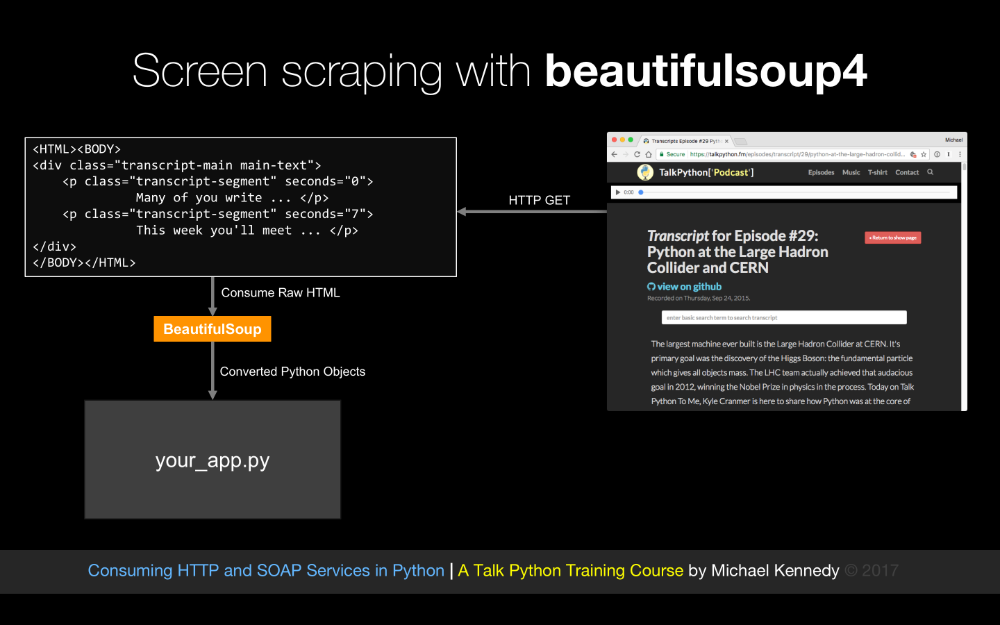
As you know, it's a services world out there, almost anything you need to interact with has an API and if there is no API, there is probably a webpage and I am going to show you that the combination of APIs and web pages allow you to connect your app to almost anything. So we might want to talk to github to work with source code, repositories, automated builds, maybe we want to use Twilio for adding telephony and text services to our app, of course we want to update people through their Slack channel, send and subscribe people to our mailing list via MailChimp charge them money over their credit cards using the Stripe APIs, query some backend business data using Salesforce, send out some emails with SendGrid or even manage and work with our projects offline through Basecamp. So if we want to connect our app to these types of services, and many more, we are going to need to learn how to work with services in Python. And that's what consuming HTTP and Soap services in Python is all about. So, whether you want to talk to github, Stripe, Basecamp or even that old fashioned Soap service that runs the backend of your business, you are going to learn how to do that here, And by working with all this services, you'll see that you can give your app super powers. I hope you are very excited to explore the world of services from Python with me. What are we going to cover in this course? Well, we are going to talk primarily about transports that run over HTTP, Rest, Json over Rest or XML, or a variety of other things, and we are even going to talk about Soap. So we are going to use Requests, we are going to use urllib2 and we are going to use urllib.requests. Now, if you are unfamiliar with these, Requests is the most popular way to write Python clients for services, however, sometimes we want to use stuff that is in the box if you will that comes with your Python distribution that everybody already has, because Requests you have to install separately. So we are going to talk about Python 2's urllib2 and Python 3's urllib and associated submodules like Requests and error and so on. Now, many of these services are going to require us to authenticate, to log in, so we are going to see how we can do username, and password authentication to access restricted services, we are going to work with a variety of different data formats. When we talk to these HTTP services, they might want to send us data back in the form of Json, or xml, or super complicated xml in the form of Soap or even binary data, so, we are going to look at how each one of these data formats is managed and worked with in Python and how to use that kind of data from a service, and finally, if there is no service, we are also going to talk about screen scraping. Often we'll have a direct end point that we can contact and use a well known API against, but if the data is on a webpage and there is no API, what do you do? Well, you do screen scraping, and screen scraping will let you go to a standard HTML page and more or less turn that HTML page into an API or series of HTML pages, so at the end of the course, the final chapter that we are going to cover is doing basically adding services to websites that don't have services by making their webpage themselves the thing that provides data to our app. So that is what we are going to cover, and who am I anyway? Well, my name is Michael Kennedy, thank you so much for taking my class, hey, that's what I look like, it's nice to meet you, you can follow me on twitter at @mkennedy and why should I be teaching this course? Well, I've been working with Python for quite a while, I run Talk Python To Me, the number one Python podcast with over three million downloads, so I've had the unique opportunity to interview hundreds of people who are doing amazing things in Python and many of them have written the libraries that we are actually going to cover here, so when it makes sense, I am going to actually give you a look behind the scenes, at the people behind some of these technologies that we are actually going to cover in this course. I am also the creator and founder of Talk Python Training, I've written many of the courses and I have over ten years experience teaching hundreds of in person and online courses throughout the world, so I am super excited you are at my class, it's great to meet you and we are going to have a great time working with all of these services.
|
|
|
transcript
|
1:34 |
The first thing you are going to need to take this course is Python of course, and I am sure many of you are happy to hear it's Python 3, not Python 2, and you might as well use Python 3.6 but if you have 3.5 or something like that installed, that's totally good, if you are on windows, there is a good chance you have no version of Python and you'll need to install Python 3; if you are on OS 10 or macOS as it's called these days, you probably have Python 2 which ships with it, but not Python 3. If you are on Ubuntu, chances are that both Python 2 and Python 3 are there, so check your system, see what it is that you need, but we are using Python 3 and we are not using neither of the 3.6 features, so if you have 3.5 or 3.4 that's totally fine. Now, there is a very small segment where we do talk about using Python 2 because the way the built ins work in Python 2 and Python 3 are different, so we do touch on Python 2 just for a moment, if you are on Windows, you are going to need to install that as well, but only if you want to do that little piece, you don't technically have to do it. Some of you may be thinking oh should we do this on 3, should we do it on 2, I think the debate about Python 3 and Python 2 is pretty much at the end. If you look at the last several PyCon keynotes done by Guido Van Rossum he always opens up with there is going to be no new versions of Python 2, no Python 2.8. So I think certainly going forward Python 3 is the place where it's at, that said, the actual differences except for the built in sections are extremely small, so really, it's either way we'll work but the code we are writing is technically Python 3 so you want to have that installed.
|
|
|
transcript
|
0:59 |
The editor and the IDE that I am going to be using throughout this course is called PyCharm. In my opinion, this is hands down the best tooling for writing Python applications; you don't have to use PyCharm, if you do want to just go to jetbrains.com/pycharm, they have two basic versions, you can get the community edition which is free and open source, or you can get the pro version which costs some money, it's not super expensive but does cost some money. For this course, I don't believe there is anything in there that is required that is only in the pro version, so the community edition should be totally fine, for taking this course, if you have the pro version, hey you have some other cool features and that's great. If you don't want to use PyCharm, that's fine, the code we are working with is not that complex, it's pretty self contained, you can use Sublime text, you can use Visual Studio Code with the Python plugin or extension, you can use Emacs, you can use Vim, but the demos I am doing are going to be in PyCharm so if you want to follow exactly along- get PyCharm.
|
|
|
transcript
|
0:32 |
We are also going to be using a API exploration tool called Postman, so Postman is a cross platform gui for interacting, analyzing and just generally recording and playing with APIs. We won't make heavy use of it, you don't have to install it if you don't want to play with it, but I find working with APIs sometimes is great to get a good understanding and play with is and then implement it in code, and you'll see me do that a few times in the course, and we are going to be using Postman so Postman is cool, and free, so it's worth checking out.
|
|
|
transcript
|
0:58 |
Finally, we are going to write a lot of code in this course. Well, I am going to write a lot of code in this course, and hopefully you follow along, it would be great when you see me doing these demos, for you to say okay, I am going to take basically the idea that I saw Michael do there, and I am going to write that, all of the APIs in fact that we are working with are public and out in the open. So, even the ones where we have to modify data are publicly accessible, I've created some special ones for this course, so you should be able to write the code and follow along in examples. So I strongly encourage you to have your own little projects, your own set of Python apps that is more or less replicating what I am doing here, but I do have the source code of exactly what I typed on the screen available to you here at github, it's consuming_services_Python_demos on my github account, and I encourage you right now to go star and/ or fork that repository so you have it as part of your record.
|
|
|
transcript
|
2:05 |
Welcome to your course i want to take just a quick moment to take you on a tour, the video player in all of its features so that you get the most out of this entire course and all the courses you take with us so you'll start your course page of course, and you can see that it graze out and collapses the work they've already done so let's, go to the next video here opens up this separate player and you could see it a standard video player stuff you can pause for play you can actually skip back a few seconds or skip forward a few more you can jump to the next or previous lecture things like that shows you which chapter in which lecture topic you're learning right now and as other cool stuff like take me to the course page, show me the full transcript dialogue for this lecture take me to github repo where the source code for this course lives and even do full text search and when we have transcripts that's searching every spoken word in the entire video not just titles and description that things like that also some social media stuff up there as well. For those of you who have a hard time hearing or don't speak english is your first language we have subtitles from the transcripts, so if you turn on subtitles right here, you'll be able to follow along as this words are spoken on the screen. I know that could be a big help to some of you just cause this is a web app doesn't mean you can't use your keyboard. You want a pause and play? Use your space bar to top of that, you want to skip ahead or backwards left arrow, right? Our next lecture shift left shift, right went to toggle subtitles just hit s and if you wonder what all the hotkeys are, click this little thing right here, it'll bring up a dialogue with all the hotkey options. Finally, you may be watching this on a tablet or even a phone, hopefully a big phone, but you might be watching this in some sort of touch screen device. If that's true, you're probably holding with your thumb, so you click right here. Seek back ten seconds right there to seek ahead thirty and, of course, click in the middle to toggle play or pause now on iOS, because the way iOS works, they don't let you auto start playing videos, so you may have to click right in the middle here. Start each lecture on iOS, that's the player, now go enjoy that course.
|
|
|
|
11:51 |
|
|
transcript
|
2:49 |
Let's begin our exploration of services and consuming services in Python by taking a survey of the various types of services that we might encounter out there in the world. We are going to do this by focusing on the lowest level services and moving up in abstractions. So the lowest level service that we could have, the way that we could talk to the service is with using just raw network sockets and just sending bytes on the wire. So we would open up a socket with bidirectional communication and we would send 00101 over the service and it knows what that means, they will say great, 1101 and so on. This is the fastest, lowest level, lowest latency way to interact with services, so there are benefits here, it's super fast and it's responsive because we can actually send custom messages tailor made for the types of messages that these two apps exchange, it can be extremely low overhead in terms of bandwidth, do you need to send four bytes as an integer? Well, maybe you just send four bytes and it just knows an integer is coming, so literally, there is no wasted sort of packaging on the messages, so why aren't all of our services like this, well, there is usually way more drawbacks than there are benefits. many time this means there is special protocols, you have some app, in order to talk to it you have to use an entirely unique protocol just to speak to that. And often those don't have standards around them, often those are brittle and just not easy to work with, not easy to get started. Another problem is proxies and firewalls, especially firewalls. So packet inspecting firewalls really hate letting traffic out of the firewall, if it's some sort of binary blob. They would much rather see some kind of HTTP traffic where they can inspect it and make sure that it's all legit and good. Also, these often run on non standard ports and there can be problems with firewalls as well. There are some platform specific issues you run into as well, like just above raw sockets, but still more or less sending raw bytes are things like on the Windows platform DCOM or .NET remoting, on Java we have RMI, remote method invocation and these might be sending like in memory representations of some kind of object from one .NET app to a .NET server for example, and that means it's extremely fragile and really inaccessible to Python or Javascript or other things like that, it's like you have to basically have the same technology on both sides. And also, if you look at the network traffic, can you make sense of it? I can't, not usually anyway, it's very hard to read just binary blobs, it's also hard to debug if things go wrong because you cannot read it, okay, but we do have low latency, low bandwidth, high speed raw sockets, and that is possible of course in Python.
|
|
|
transcript
|
5:42 |
Another thing that we might run into, especially little bit older services, especially inside enterprises, inside these big companies, they built a bunch of internet apps that they can connect together, it's very likely that what you are going to run into is a Soap web service. Now, in the early days of the 2000s, 2001, 2002, Soap services were fairly ubiquitous for intranet communication. And, of course, as Javascript grew and the internet grew in popularity especially with regard to services, the HTTP services and Json Restful services more or less edged Soap out, but it's very likely that you are going to run into a Soap service if you are working with older systems inside of a company. So it's really important that we talk about them here because you don't want to have to switch technologies just because you are talking to a old service, right, so what's the deal with these Soap services, how does that work? Well, it's basically HTTP traffic, the thing that is kind of an unusual is every request, regardless of whether you are getting something or you are updating something, every request is a post which indicates some kind of action, so here let's suppose we want to login and we are going to post to a single location and this action header actually tells the service what to do, and what we are going to send is a big blob of XML. It looks like this. And the service is going to respond with another big blob of XML, we are going to parse that apart back in our app. Now, what are the benefits? One of the things that is nice about these Soap services is they typically have some kind of UI describing them, and they also have UI that describes them for tooling, so they are really built with the expectation, it's basically required that at least one side of these, the fence, either your app or the Soap service have some really strong tooling support to generate the stuff. I go so far to say these are the easiest services to create and consume if, and this is a huge if- if both sides of these arrows, your app and the service have excellent tooling support for Soap services. that's not the case with Python, and these are certainly not the best services, that's why they are not very popular anymore, but they do have a button press generate the server side, and client side tooling support, and that way they make them easy but like I said, I don't think they are the best and I definitely don't recommend using them if you can avoid them. So what else is a drawback about Soap services, we talked about post, and this post only behavior means that it basically breaks the architecture of the internet, the internet is built around get, post, put, various HTTP verbs, and only HTTP get is allowed to be cached, and that makes proxies work better, that makes local cashing work better, there is all sorts of scaleability benefits, and other semantics around being able to support HTTP get the most common way to access resources on the internet but Soap services just entirely missed this, they just didn't even understand that HTTP verbs meant a thing on the internet when they were created, so everything is post which means a lot of the infrastructure benefits of being an HTTP service are lost. It requires tooling, so things like Javascript and Python are the real disadvantage in working with these services, but that said, we are going to cover some pretty cool stuff on working with them from Python if you must, they are often focused on remote methods instead of remote resources, so here we have a log in method rather than accessing something about our user and that can lead to poorly designed services. These Soap messages they exchange obviously they are bandwidth heavy and while you technically can read them, if you must, they are not really friendly to human beings, they are friendly to computers, and they can be read by humans, but they are not what I would call readable. Let's look at this Soap exchange, in detail. So here I have an operation, imagine this is going to be called on a web service that is a Soap service, so I want to take a number, and I want to take a number and I want to double it, I want to take an integer and double that integer, so how does this work? Well, of course we want to send this as an HTTP post, so what we are going to do when we call this, the tooling that we would have had to use to somehow generate this service, would convert this action and this data into what is called a Soap envelop. So the Soap envelop is an XML namespace laden bit of XML that is quite dreadful and you should stay away from it if you can. But like I said, if you have to call these services, being able to do it in Python is cool, so here you can see we have a Soap envelop, and there is a Soap header and a Soap body, the Soap body contains some parameter, and that parameter's value you can see is 123. So we are going to want to double the number 123. It's going to go off to the server, via post, via HTTP, some parts you don't see here, the action is actually stored in the header, it's going to process that, and generate a response that comes back to us that is also a Soap envelope. And this time the Soap body contains a double an integer response which also has an integer and that integer's value is 246. So you can see, yes, awesome, we doubled the number and you can bet that the value returned from this function very much returned 246 when we gave a 123. But it took almost a kilobyte of data exchange just send the four bytes over, the 123, and return the four bytes back, 246. So, this is not very friendly to people, to the network, there is lots of problems with it, but this is how Soap works.
|
|
|
transcript
|
2:28 |
Alright, next up, the majority of services that you are going to see, are going to be HTTP restful services. Be careful using the word restful because just certain people restful means very specific set of criteria, that most HTTP Json based services don't actually meet. Maybe they are 75% restful or whatever, so I am going to try to use HTTP services but these are more or less restful services for their features, even if they are not entirely complete. So how does this work, well, we have our app, and again we are going to do an HTTP request and again, this is going to go over HTTP but this time it's going to be a get request and it's going to be a get request against something that is a noun not a verb. And this time we are going to request API/users/7 indicating we want the details about user 7 and what we are going to get back from the server, is going to be a Json message with the name Michael and id 7, presumably, we even get more information, but just keeping it simple for the slides here. So what are the benefits? Well, there are many. This is universally accessible, this service is universally accessible, almost every platform has decent support for basic HTTP string exchange. This is super easy to do from Python, this is super easy to do from Javascript, as well as C, ObjectiveC, swift, you name it, we can call this function from basically anything that will talk to a network. Because it's HTTP and it follows the get post put standard HTTP verbs, it's firewall friendly, proxy friendly and for example this request is potentially cacheable. Reading this message name Michael id 7, is ridiculously easy, it's entirely human readable, and while it's not as light weight as the binary exchange it's dramatically more lightweight than what we would get if this was a Soap message, I've put this in the relatively light weight bandwidth story. There is some drawbacks, it's often that you will find these services that are not self-describing, there is some tooling called swagger that you can add to the server's side and then use some tooling on the client side to help describe and generate proxies and things like that but, generally speaking, these services are not self-describing and like I said, if the thing you are absolutely maximizing is bandwidth exchange, well maybe raw sockets would be that, but if it's got to go over the internet, this is about as good as it's going to get.
|
|
|
transcript
|
0:52 |
Finally, let's talk about queuing. We are not going to cover queuing in this class, but if we are taking the survey of the range of possible ways of communicating with services, queuing probably shouldn't be left out. So queuing is typically done sort of behind the firewall, right, so I've got a set of apps they are running behind the firewall, one of them is going to get some sort of operation, it's going to add some kind of work or message to the queue later on asynchronously another app that might pick that up and do something, so for example, hey I am a web server, will you send an email to this person, and I am going to carry on serving at my web pages. Some other sort of email work or process might grab that go yeah sure, I will start the outbound email campaign to this person. That is queuing, we are not going to cover queuing in this class, but just to round down the spectrum there you have it.
|
|
|
|
11:44 |
|
|
transcript
|
1:27 |
The first type of services that we are going to focus on, not surprisingly are the most popular type, that is HTTP restful services, and we are going to use a very popular package called Requests for our first look at it and then we'll come back later and look at it through the eyes of the built ins. So where are we in our overall course map? Well, we are talking about HTTP clients and right now we are focused on Requests. You may have heard of Requests, Requests or HTTP for Humans as Kenneth puts it is the most popular package for Python, not the most popular networking package, it's the most popular package, it's been downloaded seven million times a month. So, it's really popular, and you can see that it has a very simple API and the reason this exists is the built in urllib and urllib2 have some really funky APIs and it's generally hard to work with, there is a lot of funkiness and it even gets less good, if you will, in Python 3, rather than Python 2, so the built ins are not super joyous. There are reasons to use them and we will talk about what those are and when, but for our first look at HTTP services, we are going to absolutely use Requests. Like most Python packages, we are going to install Requests via pip, so here you can see its projects page on PyPi, this is the newer version of PyPi at pypi.org/projects/requests and it says to install it, we are just going to pip install requests, that's pretty straightforward, so let's go do that now.
|
|
|
transcript
|
4:06 |
Now, we are going to need to install some packages, during this class, in particular we need to install Requests, we are going to need to install Beautiful Soup, and some of the other foundational or dependent packages there. Now, one thing we could do is we could say pip install requests or something to this effect, however, if we do, this is going to modify our global system, and there is a couple of drawbacks to that, we don't want to modify our global system because it requires us to run these installers as admin, and this is kind of running arbitrary code off the internet as admin, not super recommended, it also means that we are going to use the same version of the library across every project we run, on our computer, so maybe we want to use the newest request for this, but some other projects it's old and it needs to use an older request because there is some kind of change, how do you manage those two environments? So the answer of course is to use virtual environments, so let's just ask which pip or which pip 3 is really what we want, so we want to say, see this is obviously the global one, and if we ask it what is installed, you'll see that there is a bunch of stuff installed, so, let's actually create what is called a virtual environment that we'll use for the rest of this class, so I am in a directory called /pyhton/environments, there is a lot of conventions around this actually, there is different locations for different people, sometimes you put it in your project directory, sometimes you put these outside, I am going to put them in this folder in my user profile. In Python 3, there is a built in way to create a virtual directory, so we can say Python 3, now on Windows, there is no Python 3 just be aware, you just have to have the path to Python 3 versus Python 2. So that is a little tricky, but on Linux and OS 10 we can say Python 3 and that is pretty straightforward, and we want to run the module, venv, and we want to give it some sort of path, so let's say we'll go to consuming services venv. Now, this will totally work, however, just one word of caution here- if your are on a Mac, and you are going to use PyCharm, both of these things need to be true, if you are on a Mac and you are going to use PyCharm, there is a problem with PyCharm understanding the type of basically following the symlinks too far when you set up a virtual directory this way, and so what you need to do for the time being, is add a copies flag here to say don't create symlinks, create just a copy of the Python file that we can link to directly in this environment. So, because I am going to be using PyCharm, I am going to put --copies and I am on a Mac, it's up to you, but, I recommend doing the --copies for the time being. Okay, great, we've created it, how does this change our pip story? Not at all, because notice my prompt, it still says Mac Book Pro, just standard prompt there, so what we need to do is we need to activate this, we need to basically change this individual shell temporarily to know only about that Python, so I can come over here and say . (dot) so apply this what I am about to do to this shell, and I am going to run ./consuming_svc_env/bin/activate on Windows, you don't need the dot and this is activate.patch. Notice, my prompt changed, if I ask which pip, now it's this one, again, if I ask which Python, it's now this one from this environment. Great. So, most importantly, what we are after, we were asking for a clean environment, and here we have a brand new fresh clean virtual environment, with pip and setup tools. So now we can start installing things that we are going to use for this project, here, so let's say pip install requests. And it either uses a cash version or downloads it from the internet, and then installs it, and now if we ask pip list we can see, yeey, requests is installed, so let's just verify that everything is hanging together, we'll do a quick little thing here, we can come over and import requests, and because that didn't break, things are looking good, and then we can just make sure that there is actually something reasonable here, there we go. So we've got cookies, sessions, get, post, those kinds of things. Alright, so it looks like requests was installed successfully. Now we are ready to use this environment, this clean environment which does not require admin rights on the machine and is just dedicated to our little project here, we can use this clean environment for the rest of the class.
|
|
|
transcript
|
1:53 |
So we've been able to create this virtual environment, that's great, however, let's get this into PyCharm, let's load up our project and let's actually register this environment as the one that we are going to use to execute all of our code. So over here, I actually git cloned the service demos, these are the demos that you have access to on github, and I've actually just renamed them so the name isn't so super long. And on OS 10 or macOS you can just drag and drop this into PyCharm or even Sublime text or Visual Studio Code, lots of these editors support that. And it will open the project. Okay, cool, so here we are, now how do we take our virtual environment which is over here in this Python/environments/consuming_svc/bin, this executable and make it the Python that we are going to use in PyCharm. Well, we can come over here and we go to settings, and there is a project interpreter, notice right now, it's just the system wide 3.6.0 so what I want to do is add a local virtual environment. If you want to do this entirely from PyCharm and not use the command line to create the virtual environment, that's fine, you can just use create virtual env, but because we already have one, we are going to go and do add local, now over here, I am already in this directory, because you can see here is the Python so I can just say open. on windows it's start. And I could take this over here and say okay, I want to use this, and let's go and drag it down here and say whatever that is that is the path. So now you can see it's a virtual env at Python/environments/consuming_svc_env, and everything looks good, it looks like we technically could upgrade this here, so we can go ahead and upgrade setup tools and that will happen in a second, great, install a few other things. Alright, now, when we run some code, PyCharm will now use our virtual environment.
|
|
|
transcript
|
0:38 |
So let's review installing requests, we had already created a virtual environment, but don't forget to activate it, so . (dot, space) the path activate on Windows, you don't have to do the dot and this is just activate.batch. So either way, our prompt will change and then we'll have access to the packaging tools for that environment. Then of course, we are going to do pip install requests, that is going to download and install it and then just to make sure you can make a quick pip list to see what you've got, and here we can see that requests 2.13.0 that is the latest at the time of this recording was successfully installed and ready to roll.
|
|
|
transcript
|
2:41 |
Now that we're up and running with Requests, let's make a simple get to a web page. So first of all, we are going to need the Python script to run aren't we, so let's go create a new Python file and we'll just call this simple get, and PyCharm is asking should this go into the github repository, yes, it should. Okay, so what we are going to do is we are going to start by importing Requests and that is coming out of our virtual environment that we wired into PyCharm here, and let's just make sure that works, so we'll just do a little print here and we can make, over here there is no our little run button, it's grey, that's because there is no what is called a run configuration, so let's create that by right clicking here, and saying run, and notice it's using our virtual environment Python here, and it just says hello. And so import, that worked well, our environment is working, everything is looking great so far, so the first thing we are going to need is a url. And let's just go to talkpython.fm and do a download there, so what we are going to do is we are going to use requests we are going to do a get, we are going to issue that get to a url, we are going to capture that into a variable called response, or resp, now we can come over here and just print out and see what happens, see if this works, so there is a little pause, it actually did the download and we got a 200, that is awesome, so it looks like that worked. HTTP 200, that is about as good as it gets. So, let's actually add a little check to make sure this works, so suppose I had something wrong here, we should have a 404 or something to that effect, or even worse, something worse. Okay, so it looks like the response came out great, so let's do a little test, we'll say if resp.status_code ! = to 200, then something went bad, we'll print error requesting url, maybe we'll put the little response code here, something like that. And then, I like to return or break, I can do an else here, but let's go ahead and make this a little nicer, I am going to define a main method, which is this, and that is going to be the code, and we'll just run this main method, if and only if it's time, so here we can say return and we'll be out of here, so we'll cancel a lot of this execution if there is an error but if there is not, we are going to print out, let's just print out resp.text. Now, that is going to show the entire page, you'll see it's screen by, maybe we just want the first 500 characters, just to see the title, so of course we can use a slice on the string, which is nice, here we go, so let's see the title here, talk Python to me podcast- alright, it looks like this works, so super easy, request.get, give it the url, check the status code and work with the text.
|
|
|
transcript
|
0:59 |
So that was simple, right, the whole promise of Requests is that it makes doing simple operations simple and easy and straightforward, I certainly think that that operation fit the bill. We start by importing Requests, and then we just do get url to actually download the response, now this is a blocking call, it's not going to return it's we've actually gone to the server, looked up the dns for talkpython.fm done the get, got the response, entirely downloaded it so this is a blocking call, and we have response and it has both the status code set so we also have headers and cookies and things like that and we can access the text property, so here we are just printing out, here is the first 500 characters that we got, just see what this was all about, now this was really cool that we could go do this simple get against the website, but what we want to work with are actually services, things that are meant to talk, computer to computer, program to program, not program to humans or program to browser to humans, however you want to think about it, so that is what we are going to do next.
|
|
|
|
17:18 |
|
|
transcript
|
0:57 |
While HTML and text is really made for humans, that is not the focus of this course, a focus of this course is to consume data and formats meant for programs and computers. So, what does that include, well, Json is the most popular exchange format these days, especially around HTTP restful services, back when Soap was popular XML was really important and we saw how XML being passed around or take things like rss feeds, there is a number of older services that still use xml so we are going to work with that, obviously binary data is very often something we want to access and download, think of a zip file or an image or something and then. Soap, we are also going to come back and look at Soap, but for now, let's focus on Json, so we are going to look at how we consume Json services, obviously, but before we do that, I think the right place to start is for us actually to just do a little bit of work with Json in Python and leave the network out of it.
|
|
|
transcript
|
5:53 |
So here I have a little bit of Json text. So, this Json string, if converted to Json or to other objects has a demo field and that says processing Json in Python, and the instructor is Michael and the duration is 5, presumably minutes. So let's start working with this, let me just print this thing out for a second, now, notice this is still running the old one so I am going to right click and run that and it prints it out and it's kind of indistinguishable from say like a Python dictionary, which actually means working with Json from Python is super natural because the mapping between Json as something in Javascript or text mapped over to Python as dictionaries is nearly one to one, it's not exactly but very close, but let's just make sure that that is actually a string so I'll say what is the type of this things as well, now you could see, okay it is a str, it is, so how do we load this? Well, Python comes with what is described as 'batteries included' and that means it has a rich standard library including support for Json, you could see that is coming straight out of the library, so we don't need anything external, we don't need to pip install anything, to work with this, so what we are going to do is we are going to come over here and we are going to parse this Json so we'll say data, so there is a couple of things we can do, we can load or we can load s, now, I think the naming choices here were super poor how about load from string, or load from file, or something to that effect, but load you can see fp for file pointer and load s, s for string so much for good variable naming, but the one we are looking for is we have some text in memory, we want to turn that from text in the form of Json into Python dictionaries in the form of data, so we are going to use this and this is the one you are going to use most of the time when you are doing services because you will make an http request and you will have text in memory, so text Json and then we can print this out again, we'll just print out data and if I run this, you could see it looks really similar, it's different it has single quotes instead of double, because that is the way Python dictionaries represent themself, and it's all in one line, again, because of that. But if I gave you that string there, you couldn't really be sure that that didn't come from some sort of service, so let's go and do type again, here we go, str says it's string, now it's a dictionary and you can see that actually the duration is a number, it doesn't have quotes on it, and that is pretty cool, let's get a few pieces of information here, we'll say in structure= now we want to get information, we want to get something on this dictionary, so that is standard Python, you just do that by indexing in with the key so we'll say instructor and then I'll print your instructor is { }.format, maybe I'll even spell it right, how about that? Now if we run it, you can see your instructor is Michael, now this is usually good, but sometimes this isn't so good, so for example if this doesn't appear we are going to get something super bad, we are going to get a KeyError, right, it sort of interspersed throughout here but somewhere in here, there we go, KeyError instructor, so we can use a different format, different style of getting the value, so that is probably recommended because the internet you never know, we can say get me an instructor like this and then it just says oh, your instructor is none, or we can even ply a default here saying substitute if there is not instructor presented or we are just going hey look, you are getting a substitute teacher. Alright, right now it's substitute, so if I go and put that back, now, hey your instructor is Michael, very cool, okay, so that is great, final thing let's make a change to this data, let's say you know what, your new instructor is going to be Jeff, and somehow I want to let's go and just print out the data and see that is changed, oops, don't need that twice, do we, we have your instructor is Jeff, okay, so here we are processing this, instructor Jeff, but this is actually a Python dictionary, right, it's a dict, we want this back serialized as Json, so how do we get this back, we'll say new Json and then we have a reverse of load s to dump s, again, naming is really kind of unfortunate but it is what it is, you can dump Json to a file pointer, or you can dump s into memory for the same reason that we frequently use the load s in services, we are going to use dump s in services as well, and then let's just print out both the type of new Json and also new Json itself. Let her run, boom, there it is at the end we have class str and now this is the Json, notice the double quotes and our class is still called the same but our instructor is Jeff, same duration. So that is basically it, working with Json from Python, really it comes down to the Json module, load s, dump s, and then somewhere in the middle, just working with straight up Python dictionaries, one thing that may become some sort of hangup for you and there are ways to work around it, with the Json module is that is there was some kind of date in here, this would not work so for example, if we come over here, and this has a datetime like now, and we'll just put str time or something like that, if we try to run that, it's woow, datetime is not a serializable, so basically, you can register handlers for serialization and you could also just do like a string representation, so you could choose like what string or representation you want, and then we'll store it like that, okay. But dates themselves are not supported in Json, just be careful of that. Alright, now you know about Json and working with it from Python, let's go get it from somewhere way more interesting than an in memory static string, let's go get it from a web service, somewhere like gihub.
|
|
|
transcript
|
1:17 |
So you've seen Json parsing and serialization in action in Python, let's review the key concepts that were in play; so this is more or less the same code that we just wrote and remember we started with importing of the Json module, this is a built in thing in the standard libraries, this is a built in thing in the Python standard library so we didn't have to install an external package to get this support, we just import Json and we're off to the races, so we started with Json text which is just an in memory version of some Json string representation, and we want to turn that into something that we could actually work with in Python, so what we did is we called the load s, load from sting, and we passed the Json text in to be parsed, we got back data, which we saw was a dictionary, so we have this dictionary, we work with it however you work with dictionaries in Python using get, assigning to a key to change the values, things like that and then to get the data back out, to send it off to somewhere to save it to a file of course we just did a dump s, dump to string and what we get back is more text, now, it's worth noting that the thing that came out here is sort of somewhat minified Json, there is no like line breaks or indentation or anything pretty about it, you can set an indentation setting on the dump s method and it will be a little bit nicer text if you care about readability.
|
|
|
transcript
|
8:35 |