
- C++ Home
- C++ Overview
- C++ Environment Setup
- C++ Basic Syntax
- C++ Comments
- C++ Hello World
- C++ Omitting Namespace
- C++ Tokens
- C++ Constants/Literals
- C++ Keywords
- C++ Identifiers
- C++ Data Types
- C++ Numeric Data Types
- C++ Character Data Type
- C++ Boolean Data Type
- C++ Variable Types
- C++ Variable Scope
- C++ Multiple Variables
- C++ Input Output Operations
- C++ Basic Input/Output
- C++ Cin
- C++ Cout
- C++ Manipulators
- Type System & Data Representation
- C++ Modifier Types
- C++ Storage Classes
- C++ Constexpr Specifier
- C++ Numbers
- C++ Enumeration
- C++ Enum Class
- C++ References
- C++ Date & Time
- C++ Operators
- C++ Operators
- C++ Arithmetic Operators
- C++ Relational Operators
- C++ Logical Operators
- C++ Bitwise Operators
- C++ Assignment Operators
- C++ sizeof Operator
- C++ Conditional Operator
- C++ Comma Operator
- C++ Member Operators
- C++ Casting Operators
- C++ Pointer Operators
- C++ Operators Precedence
- C++ Unary Operators
- C++ Scope Resolution Operator
- C++ Control Statements
- C++ Decision Making
- C++ if Statement
- C++ if else Statement
- C++ Nested if Statements
- C++ switch Statement
- C++ Nested switch Statements
- C++ Loop Types
- C++ while Loop
- C++ for Loop
- C++ do while Loop
- C++ Foreach Loop
- C++ Nested Loops
- C++ Jump Statements
- C++ break Statement
- C++ continue Statement
- C++ goto Statement
- C++ Return Values
- C++ Strings
- C++ Strings
- C++ Loop Through a String
- C++ String Length
- C++ String Concatenation
- C++ String Comparison
- C++ Functions
- C++ Functions
- C++ Multiple Function Parameters
- C++ Recursive Function
- C++ Function Overloading
- C++ Function Overriding
- C++ Default Arguments
- C++ Arrays
- C++ Arrays
- C++ Multidimensional Arrays
- C++ Pointer to an Array
- C++ Passing Arrays to Functions
- C++ Return Array from Functions
- C++ Array Decay
- C++ Structure & Union
- C++ Structures
- C++ Unions
- C++ Class and Objects
- C++ Object Oriented
- C++ Classes & Objects
- C++ Class Member Functions
- C++ Class Access Modifiers
- C++ Static Class Members
- C++ Static Data Members
- C++ Static Member Function
- C++ Inline Functions
- C++ this Pointer
- C++ Friend Functions
- C++ Pointer to Classes
- C++ Constructors
- C++ Constructor & Destructor
- C++ Default Constructors
- C++ Parameterized Constructors
- C++ Copy Constructor
- C++ Constructor Overloading
- C++ Constructor with Default Arguments
- C++ Delegating Constructors
- C++ Constructor Initialization List
- C++ Dynamic Initialization Using Constructors
- C++ Destructors
- C++ Virtual Destructor
- C++ Inheritance
- C++ Inheritance
- C++ Multiple Inheritance
- C++ Multilevel Inheritance
- C++ Object-oriented
- C++ Overloading
- C++ Polymorphism
- C++ Abstraction
- C++ Encapsulation
- C++ Interfaces
- C++ Virtual Function
- C++ Pure Virtual Functions & Abstract Classes
- C++ Override Specifiers
- C++ Final Specifiers
- C++ Design Patterns
- C++ Creational Design Patterns
- C++ Singleton Design Pattern
- C++ Factory Method Design Pattern
- C++ Abstract Factory Pattern
- C++ Prototype Design Pattern
- C++ Structural Design Patterns
- C++ Facade Design Pattern
- C++ Iterator Design Pattern
- C++ Mediator Design Pattern
- C++ Memento Design Pattern
- C++ Observer Design Pattern
- C++ State Design Pattern
- C++ Strategy Design Pattern
- C++ Template Method Design Pattern
- C++ Visitor Design Pattern
- C++ Behavioural Design Pattern
- C++ File Handling
- C++ Files and Streams
- C++ Reading From File
- C++ Advanced
- C++ Exception Handling
- C++ Dynamic Memory
- C++ Move Semantics
- C++ Namespaces
- C++ Templates
- C++ Preprocessor
- C++ Signal Handling
- C++ Multithreading
- C++ Web Programming
- C++ Socket Programming
- C++ Concurrency
- C++ Advanced Concepts
- C++ Lambda Expression
- C++ nullptr
- C++ unordered_multiset
- C++ Chain of Responsibility
- C++ Structural Design Patterns
- C++ Adapter Pattern
- C++ Bridge Pattern
- C++ Composite Pattern
- C++ Decorator Pattern
- C++ Command Pattern
- C++ Proxy Pattern
- C++ Useful Resources
- C++ Questions and Answers
- C++ Quick Guide
- C++ Cheatsheet
- C++ STL Tutorial
- C++ Standard Library
- C++ Useful Resources
- C++ Discussion
- C++ Online Compiler
Array Decay in C++
Array decay refers to the loss of type and dimensions of an array. The array is treated as a pointer to the first element instead of the whole array in some cases, like when we pass an array to a function by pointer or value. As a result, the original array's size and type information are lost.
Due to this decay, sizeof operator no longer gives the full size of the array instead it returns the size of the pointer. It causes incorrect behavior in functions that are dependent on knowing the number of elements.
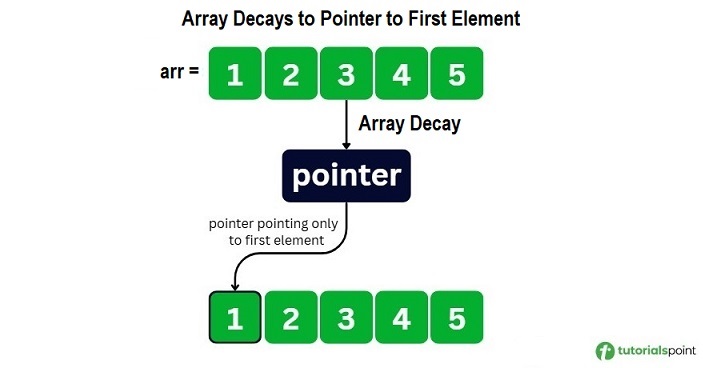
When Does an Array Decay Occur in C++?
An array decay can occur in following scenarios −
Let's understand these three scenarios in detail and how they can trigger an array decay.
Passing an Array to a Function
While passing an array to a function, the array automatically decays into a pointer. After the decay, the function does not receive the size of the array, and only receives a pointer pointing to first element of the array.
The following example demonstrates how passing an array arr to the printSize() function decays to a pointer that points to first array element.
#include <iostream>
using namespace std;

void printSize(int *arr){
   cout << "\nSize of array inside function: "
      << sizeof(arr) << " bytes"
      << endl;
}

int main(){
   int arr[5] = {1, 2, 3, 4, 5};

   cout << "Original Size of the array " << sizeof(arr)
      << " bytes" << endl;
   cout << "Number of elements: "
      << sizeof(arr) / sizeof(arr[0]) << endl;

   // Array decay occurs here
   printSize(arr);

   return 0;
}
The output of the above code is as follows. You can observe the array size before and after passing it to the function −
Original Size of the array 20 bytes
Number of elements: 5

Size of array inside function: 8 bytes
Assigning an Array to a Pointer
You can assign an array to a pointer in C++. When you assign an array to a pointer, the array automatically decays to a pointer.
Here is an example demonstrating array decay while assigning the array arr to a pointer ptr.
#include <iostream>
using namespace std;

int main() {
   int arr[5] = {10, 20, 30, 40, 50};


   int* ptr = arr;  // Array decay occurs here

   cout << "Accessing elements using pointer:" << endl;
   for (int i = 0; i < 5; i++) {
      cout << "*(ptr + " << i << ") = " << *(ptr + i) << endl;
   }

   cout << "Address of arr[0]: " << &arr[0] << endl;
   cout << "Value of ptr: " << ptr << endl;

   return 0;
}
The output of the above code is as follows −
Accessing elements using pointer:
*(ptr + 0) = 10
*(ptr + 1) = 20
*(ptr + 2) = 30
*(ptr + 3) = 40
*(ptr + 4) = 50
Address of arr[0]: 0x7ffd7a353890
Value of ptr: 0x7ffd7a353890
Using an Array in Pointer Arithmetic
You can use pointer arithmetic to access array elements using arithmetic operations like addition and subtraction. This leads to array decay as the array loses its size information.
In this example, we have used *(arr + 2) to access the third element of the array −
#include <iostream>
using namespace std;

int main() {
   int arr[5] = {10, 20, 30, 40, 50};

   cout << "Array elements: ";
   for (int i = 0; i < 5; i++){
      cout << arr[i] << " ";
   }
   cout << endl;

   // Size of array before decay
   cout << "Array size before decay: " << sizeof(arr)
      << " bytes" << endl;

   // Array decay happens here
   cout << "\n3rd element using pointer arithmetic: *(arr + 2) = "
      << *(arr + 2) << endl;

   // Size after decay
   cout << "Size of (arr + 2): " << sizeof(arr + 2)
      << " bytes " << endl;

   return 0;
}
The output of the above code is as follows. You can observe the size of element before and after the pointer −
Array elements: 10 20 30 40 50
Array size before decay: 20 bytes

3rd element using pointer arithmetic: *(arr + 2) = 30
Size of (arr + 2): 8 bytes
Problems Caused by Array Decay in C++
Array decay can lead to several problems in C++ programming. Some of the problems are mentioned below:
Cannot Determine Array Size Inside Function
The array is decayed into a pointer when an array is passed as a function parameter. The pointer only stores the address and has no information about the number of elements in the array, so the sizeof() function gives the size of a pointer and array size can not be determined.
In the example below, we have passed an array arr as a parameter in the function func. We have calculated the array size in the main function and the func() function. The func() function returns the size of array.
#include <iostream>
using namespace std;

void func(int arr[]) {

   // array decay occur here as arr[] was passed as a parameter
   int size = sizeof(arr) / sizeof(arr[0]);

   cout << "Inside function:" << endl;
   cout << "sizeof(arr) = " << sizeof(arr) << " bytes (pointer)" << endl;
   cout << "sizeof(arr[0]) = " << sizeof(arr[0]) << " bytes" << endl;
   cout << "Calculated size = " << size << " (WRONG!)" << endl;
   cout << endl;
}

int main() {
   int arr[5] = {1, 2, 3, 4, 5};

   cout << "In main function:" << endl;
   cout << "sizeof(arr) = " << sizeof(arr) << " bytes" << endl;
   cout << "sizeof(arr[0]) = " << sizeof(arr[0]) << " bytes" << endl;
   int size = sizeof(arr) / sizeof(arr[0]);
   cout << "Calculated size = " << size << " (CORRECT!)" << endl;
   cout << endl;

   func(arr);

   return 0;
}
The output of the above code is as follows −
In main function:
sizeof(arr) = 20 bytes
sizeof(arr[0]) = 4 bytes
Calculated size = 5 (CORRECT!)

Inside function:
sizeof(arr) = 8 bytes (pointer)
sizeof(arr[0]) = 4 bytes
Calculated size = 2 (WRONG!)

Warnings/Errors:
main.cpp: In function 'void func(int*)':
main.cpp:7:23: warning: 'sizeof' on array function parameter
'arr' will return size of 'int*' [-Wsizeof-array-argument]
    7 |     int size = sizeof(arr) / sizeof(arr[0]);
      |                      ~^~~~
Cannot Copy Arrays Using = Operator
You cannot use the "=" operator to copy one array to another array as the array decays into a pointer. The '=' operator copies the address but we can not reassign the array memory as it is already fixed. So, it will show an error.
Here is an example to copy one array to another array using "=" operator.
#include <iostream>
using namespace std;

int main() {
   int a[3] = {1, 2, 3};
   int b[3];

   // Array decay happens here
   // 'a' decays to a pointer to first element
   b = a;

   cout << "b elements: ";
   for (int i = 0; i < 3; i++)
      cout << b[i] << " ";

   return 0;
}
The output of the above code is as follows −
Warnings/Errors:
main.cpp: In function 'int main()':
main.cpp:11:7: error: invalid array assignment
   11 |     b = a;
      |     ~~^~~
Cannot Compare Arrays Directly
Arrays can not be compared directly using comparison operators(==, !=) because when