Spring Boot is a rapid application development platform built on top of the popular Spring Framework.
1. Spring Boot
Spring Boot is an opinionated framework built on top of the Spring Framework.
You can find out more about the Spring framework and its modules in our Spring tutorial.
Spring typical requires a lot of configuration. Spring Boot simplifies this setup by providing defaults for many features. You can still adjust the defaults according to your needs.
Spring Boot is mostly used to create web applications but can also be used for command line applications.
A Spring Boot web application can be built to a stand-alone JAR.
This JAR contains an embedded web server that can be started with java -jar.
Spring Boot provides selected groups of auto configured features and dependencies, which makes it faster to get started.
2. Download and installation of the Spring Tool Suite
The Spring Tool Suite (STS) can be downloaded from the Spring tools site
After the download unpack it and STS is ready to be started. The latest STS release contains a runtime Java, so no additional installation is required.
Issue with the tooling can be reported here: https://github.com/spring-projects/sts4 Nightly builds are available here: https://dist.springsource.com/snapshot/STS4/nightly-distributions.html
3. Example: Create your first Spring Boot application
In this exercise, you create a starter Spring Boot webapplication using the Gradle build system. Later exercises will extend this application. The final version of this application will allow users to submit issues.
3.1. Create application
Click on to open the spring project creation wizard.
Use com.vogella.spring.issues as name and select values similar to the following screenshot.
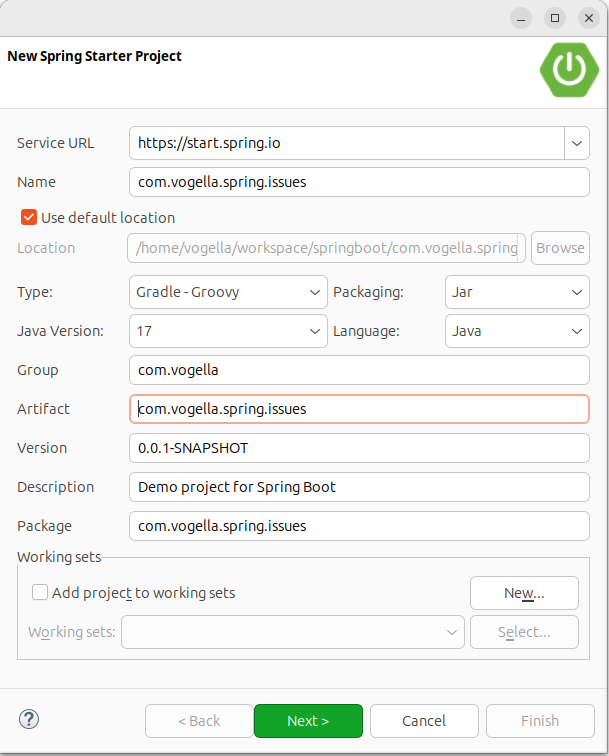
Add Spring Web and the second page and press Finish.
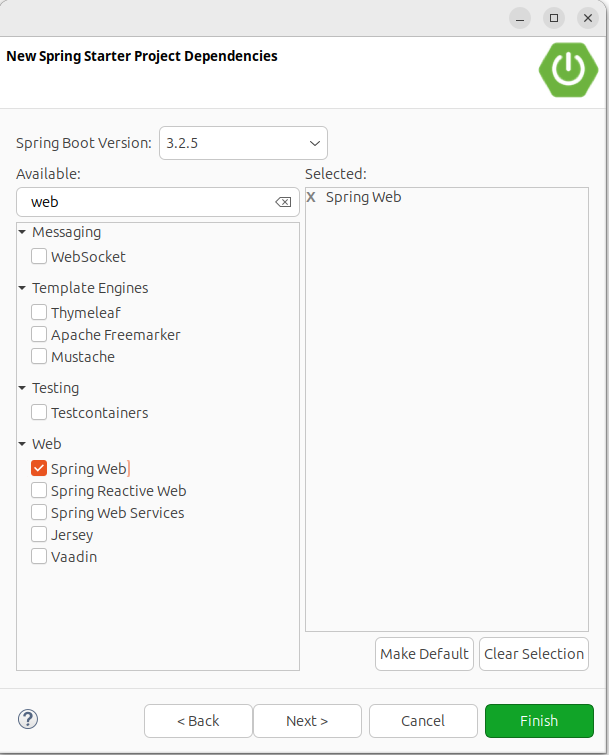
| You can also create your project with the online wizard and import it into your favorite IDE. |
Three folders were automatically created:
-
src/main/java- used to save all java source files -
src/main/resources- used for templates and any other files -
src/main/test- used for tests
3.2. Adjust the generated code
Open your project and create a new Java class named HelloWorldController.java in the com.vogella.spring.issues package of the src/main/java folder:
package com.vogella.spring.issues;

import org.springframework.web.bind.annotation.GetMapping;
import org.springframework.web.bind.annotation.RestController;


@RestController
public class HelloWorldController {

    @GetMapping("/")
    String index() {
        return "Hello, World!";
    }

}
3.3. Start application
Right-click on the Application class and select .
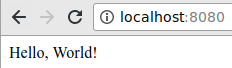
The embedded server starts listening on port 8080.
When you point your browser to https://localhost:8080 you should see the welcome message:
4. Exercise - Building the base for an issue tracking web application
In this exercises you extend the application you created earlier.
4.1. Configuring Spring Boot for web based applications
This application will use additional Java libraries. These libraries serve the following purpose:
-
Thymeleaf:: Thymeleaf is a powerful template processing engine for the Spring framework.
-
Spring Boot Devtools:: The Spring Boot Devtools automatically recompiles and redeploys the app upon saving and provide additional development experience enhancements
-
Spring Data JPA:: Spring Data JPA makes it easy to implement JPA based repositories and build Spring-powered applications that use data access technologies.
-
H2:: H2 is a Java SQL database. It’s a lightweight database that can be run in-memory.
To make these libraries available, open the build.gradle file in the root folder of the project.
Add the following to the section 'dependencies'.
    implementation('org.springframework.boot:spring-boot-starter-thymeleaf')
    implementation('org.springframework.boot:spring-boot-starter-data-jpa')
    runtime('org.springframework.boot:spring-boot-devtools')
    runtime('com.h2database:h2')
Afterwards, right-click on your project and select .
|
You can activate auto-refresh for Gradle dependencies. This will automatically synchronize your project, if you change your Gradle dependencies. img:sts-gradle-automatic-project-sync.png[] |
4.2. Validate
Your build.gradle should now look similar to the following.
| Your versions might be different. |
plugins {
    id 'org.springframework.boot' version '2.3.0.RELEASE'
    id 'io.spring.dependency-management' version '1.0.9.RELEASE'
    id 'java'
}

group = 'com.vogella'
version = '0.0.1-SNAPSHOT'
sourceCompatibility = '14'

repositories {
    mavenCentral()
}

dependencies {
    implementation 'org.springframework.boot:spring-boot-starter-web'
    implementation('org.springframework.boot:spring-boot-starter-thymeleaf')
    implementation('org.springframework.boot:spring-boot-starter-data-jpa')
    runtime('org.springframework.boot:spring-boot-devtools')
    runtime('com.h2database:h2')
    testImplementation('org.springframework.boot:spring-boot-starter-test') {
        exclude group: 'org.junit.vintage', module: 'junit-vintage-engine'
    }
}

test {
    useJUnitPlatform()
}
4.3. Start application
If another web application is already running on the same port, you need to stop it first.
Start your application with right-click on your project .
4.4. Test reload
Since we have the dev-tools dependency added to the project we can use its live-reload functionality.
Without any further configuration it reloads the application every time you save a file in the project.
Change the "Hello, World!" in your HelloWorldController class to something else. Save and reload the application in your web browser. The message returned by the web application should have changed.
5. Exercise - Creating a web @Controller
Create a new package with the name com.vogella.spring.issues.controller in the src/main/java folder.
In there, create the following Class IssueController.
package com.vogella.spring.issues.controller;

import org.springframework.web.bind.annotation.GetMapping;
import org.springframework.web.bind.annotation.PostMapping;
import org.springframework.web.bind.annotation.RestController;

@RestController                   // (1)
public class